
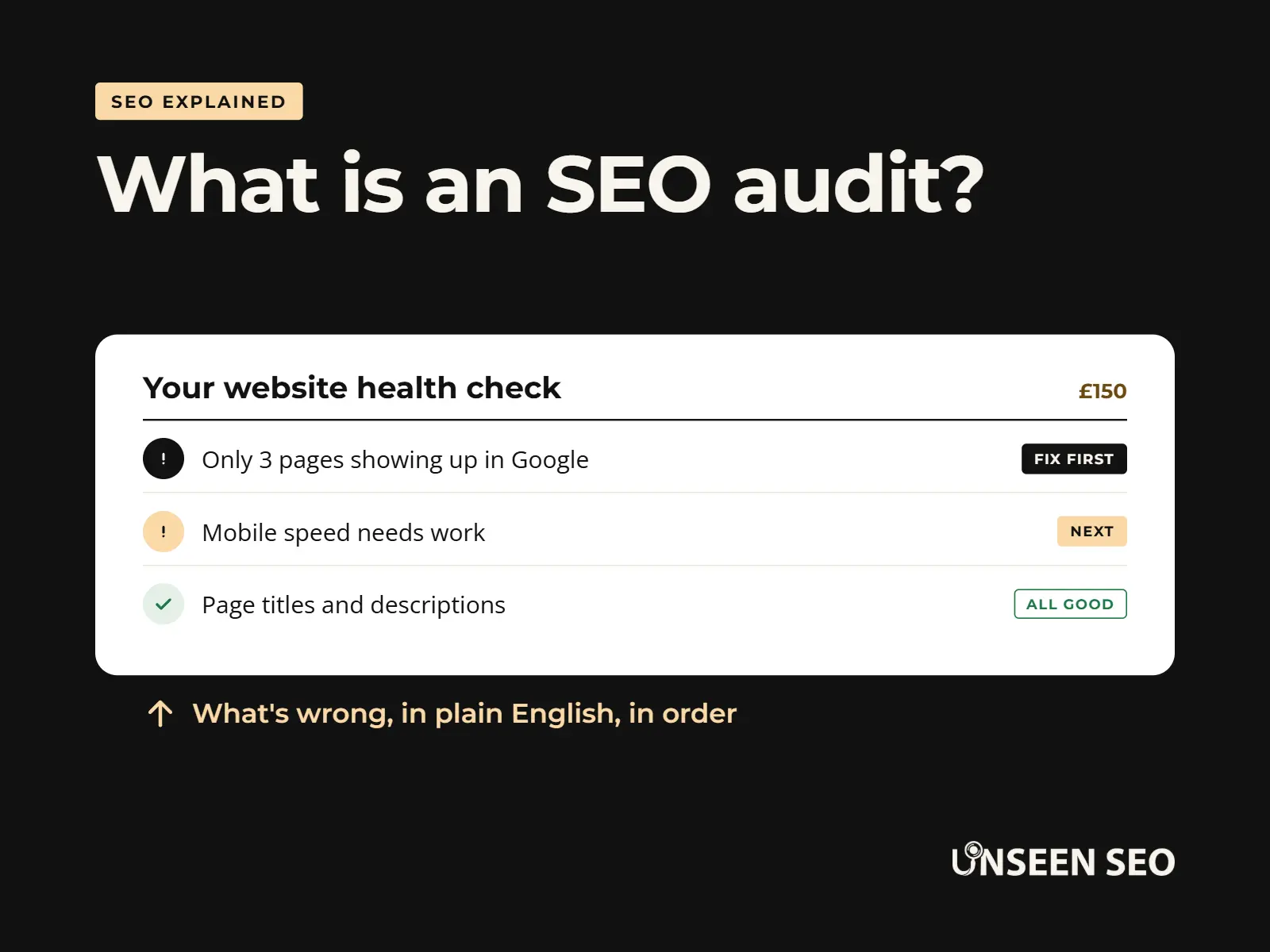
An SEO audit sounds like something involving a clipboard, a stern face and a very long invoice. In reality, it’s a simple, thorough check of your website that tells you what’s working, what’s holding you back, and what to fix first. It doesn’t need to cost a fortune either: ours is £150, written in plain English.
If you’ve been quoted vague “packages” by bigger agencies, or told you need to sign up before anyone will tell you what’s wrong, it’s fair to feel a bit wary of the word “audit”. So this guide covers the lot: what an SEO audit actually is, what it checks, what the report looks like, how to do one yourself for free, and when it’s worth paying someone.
It’s a long one, so use the contents below to skip to the bit you need.
Contents
- What is an SEO audit?
- Why your website needs an SEO audit
- What an SEO audit checks
- What an SEO audit report looks like
- How to do an SEO audit yourself, step by step
- A quick SEO audit checklist
- Free SEO audit tools worth using
- Can AI or ChatGPT do an SEO audit?
- DIY, free tool or professional SEO audit service?
- How much does an SEO audit cost?
- How often should you audit your website?
- What happens after an SEO audit
- SEO audit FAQs
What is an SEO audit?
An SEO audit is a health check for your website. It looks at how easily Google can find, understand and trust your pages, then spots the problems stopping you showing up in search results and puts them in order of what to fix first.
Think of it as an MOT for your website. Nobody gets excited about an MOT, but you’d rather find the dodgy brake light in the garage than at the side of the road. A website SEO audit does the same job: it finds the faults before they cost you customers.
SEO (search engine optimisation) is just the work of making your website easier to find on Google and other search engines. An audit is the bit where someone stops, looks properly, and writes down what needs doing. It’s a snapshot, not a contract, so a good one should leave you with a clear to-do list whether or not you ever speak to the person who wrote it again.
You’ll also hear it called an SEO site audit, an SEO website audit or an SEO audit for your website. They’re all the same thing. A “technical SEO audit” or an “on-page SEO audit” usually means a narrower check of just one part, which we’ll get to below.
Why your website needs an SEO audit
Most small business owners can feel when something isn’t right with their website, even if they can’t put their finger on it. A few classic signs:
- You don’t show up on Google for your own business name, or for the obvious thing you sell
- Enquiries from the website have quietly dried up
- Your website was built a few years ago and nobody has looked at it properly since
- A competitor with a worse service keeps turning up above you
- You’ve paid for “SEO” before and have no idea what you got for the money
Any one of those is a good reason to get an audit. The point isn’t to make you feel bad about your website. It’s to swap guesswork for a clear list of what’s actually wrong, so you stop spending time (and money) on things that don’t matter.
It’s also worth knowing that Google has no idea how good your service is. It can only judge what’s on your website and what other websites say about you. If those signals are weak, a brilliant business can stay almost invisible online. That’s the “unseen” problem we named ourselves after, and an audit is usually the quickest way to fix it.
If your specific worry is not showing up at all, our guide to why your business might not show up on Google covers the most common causes.
What an SEO audit checks
A proper SEO audit looks at your website from a few different angles. Some audits only cover one of these, which is fine as long as you know that’s what you’re paying for. A full audit should cover all of them, in proportion to what your business actually needs.
Technical SEO audit: can Google find and read your site?
A technical SEO audit checks the plumbing. If Google can’t get into your pages, nothing else matters, however lovely the writing is. The main things checked here are:
- Crawlability: whether Google’s crawler (the program that reads websites) can actually reach every page
- Indexing: whether those pages have been added to Google’s index, the giant library it picks search results from. Pages that aren’t indexed can’t rank at all
- Your sitemap and robots.txt file: the map you give Google of your site, and the file that tells it where it’s allowed to go
- Accidental blocks, like a stray noindex tag left on from when the site was being built (more common than you’d think)
- Broken pages and redirects: 404 errors and redirects that send visitors, and Google, the long way round
- Duplicate versions of the same page, which canonical tags are meant to sort out
- Security: whether the whole site runs on HTTPS (the padlock in your browser bar)
Real example: when we audited our own website, the biggest issue was a sitemap error that meant Google had only indexed three pages. Our service pages and blog were effectively invisible. That’s exactly the kind of thing a technical audit exists to catch.
Speed and mobile experience
Slow pages lose impatient visitors, and Google notices. An audit checks how quickly your pages load and how they behave on a phone, using Google’s own Core Web Vitals measurements. Since Google now judges sites mainly on their mobile version (that’s mobile-first indexing), a site that’s fine on a laptop but clunky on a phone is a real problem.
On-page SEO audit: does each page make sense?
An on-page SEO audit (sometimes called an SEO page audit) goes through your pages one by one. It’s about whether each page clearly tells Google, and visitors, what it’s about. That covers:
- Your meta titles and meta descriptions: the blue headline and short summary people see in Google’s results
- Headings, and whether each page has one clear main heading
- Whether the words on the page match what people actually type into Google (that’s keyword research, and it’s less scary than it sounds)
- Alt text on images, which describes them for screen readers and for Google
- Schema markup, a bit of behind-the-scenes code that labels your content so Google understands it (this is a service page, these are our opening hours, and so on)
Content audit: is there enough useful stuff on your pages?
This is where an audit looks at what you’ve actually written. Does each page answer what a visitor is looking for? Does it match their search intent, the reason behind the search? Pages with barely anything on them get flagged as thin content, and pages that say the same thing as each other get flagged as duplicate content.
A content audit also spots gaps: questions your customers keep asking that your website never answers. Those gaps are usually your best ideas for new pages. If you want to go further than fixing what’s there, a content strategy turns those gaps into a proper plan.
Internal linking: do your pages point to each other?
Internal linking is simply how your own pages link to one another. Good internal links help visitors find their way around and show Google which pages matter most. A page nothing links to is called an orphaned page, and orphans tend to get ignored by visitors and Google alike.
Off-page audit: what does the rest of the internet say about you?
Google trusts websites that other trustworthy websites point to. Those links are called backlinks, and an off-page audit looks at who’s linking to you, how good those websites are, and whether any of the links look dodgy.
For most small businesses the answer is “not many, and a few spammy ones you’ve never heard of”. That’s normal, and usually nothing to panic about. Google mostly ignores junk links from things like link farms. The useful part is the plan for earning a handful of genuine, local ones.
Local SEO audit: can people nearby find you?
If your customers are local, this is often the most important part of the whole audit. A local SEO audit checks:
- Whether your Google Business Profile is claimed, complete and kept up to date (we’ve written a full guide to setting up a Google Business Profile)
- NAP consistency: whether your business name, address and phone number match everywhere they appear online
- Local citations: listings in directories like Yell or Bing Places
- Your chances of appearing in the local pack, the map and three businesses Google shows for searches like “plumber near me”
- Reviews, and whether you’re replying to them
AI search readiness
More people now get answers from Google’s AI Overviews, ChatGPT and similar tools before they ever click a link. The good news is that the same basics apply: if search engines can read your site easily, and it clearly answers real questions, AI tools are more likely to understand it and mention you too. A modern audit checks that nothing is blocking those tools and that your content is structured clearly enough to be quoted. Clear authorship and real expertise matter here too (Google calls this E-E-A-T).
Tracking: can you see what is working?
Last but not least, an audit checks whether you’ve got Google Search Console and Google Analytics set up. They’re both free, and between them they show how people find your site and what they do once they arrive. A surprising number of businesses don’t have either, which is a bit like running a shop with the lights off.
A quick word on ecommerce SEO audits
If you sell online, an ecommerce SEO audit covers all of the above plus a few extras: product and category pages, filters that accidentally create thousands of near-identical pages, out-of-stock products, and product schema. The principles are the same; there’s just more of it.
What an SEO audit report looks like
An SEO audit report is only useful if you can actually understand it and act on it. Some agencies hand over a 50-page PDF packed with screenshots and red warning icons, which looks impressive and then lives in a drawer forever.
A good report should give you three things: the short version up front, scores you can track over time, and a list of fixes in order of what matters most. Here’s what ours looks like, using a real audit of our own website:
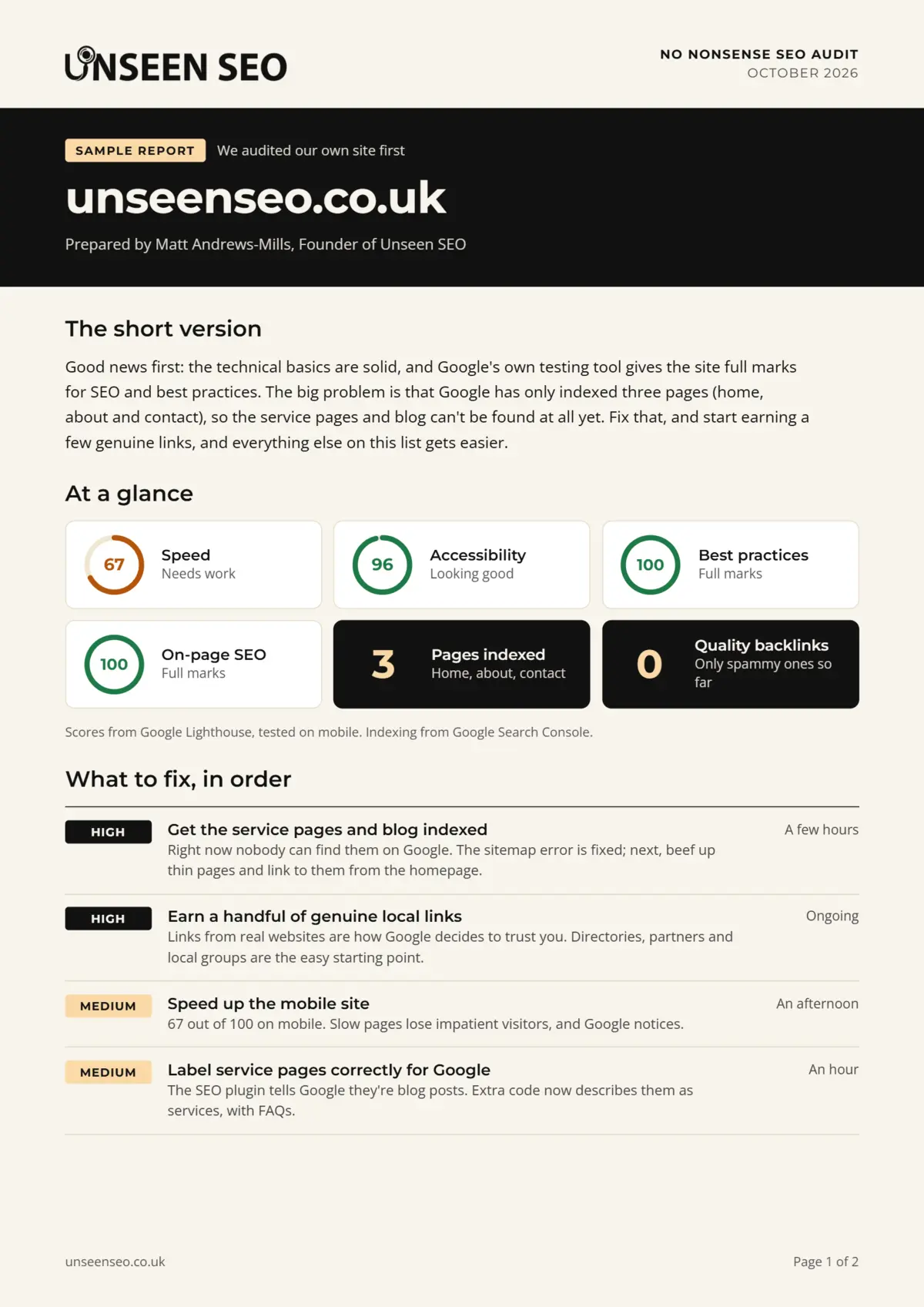
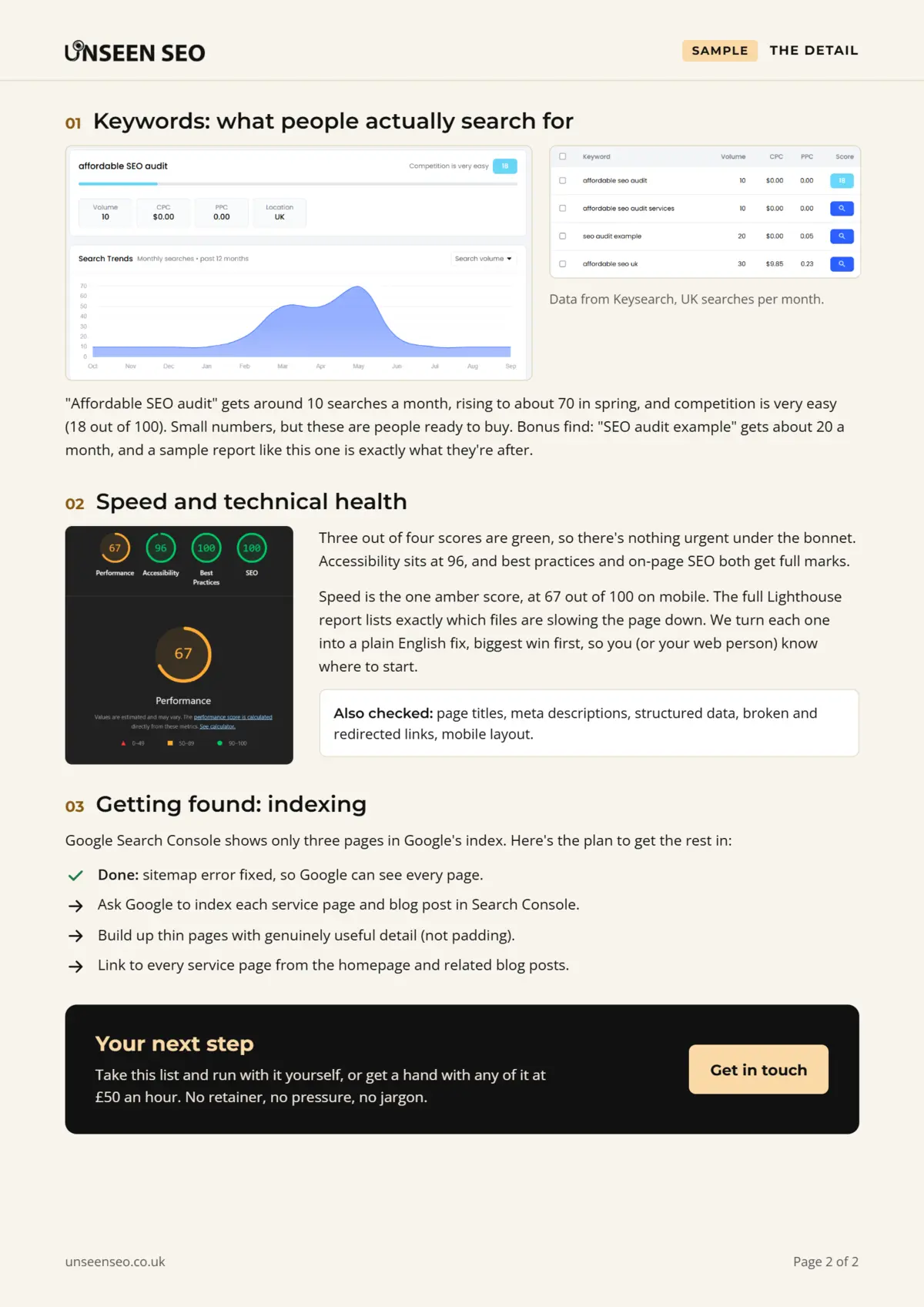
Page one is the summary: speed scores from Google Lighthouse, how many pages Google has indexed, how many decent backlinks the site has, and the top priorities with a rough idea of how long each takes. Page two is the detail: keyword research, what the speed scores actually mean, and a step-by-step plan for the biggest problem.
If you’re looking for SEO audit templates to do this yourself, that structure works for any size of business: summary, scores, priorities, then detail. Keep it short enough that someone will actually read it.
How to do an SEO audit yourself, step by step
Yes, you can do your own SEO audit, and for a small website it’s a very sensible place to start. It’ll take a few hours rather than a few minutes, and the free tools below will do a lot of the heavy lifting. Here’s how to do an SEO audit without spending a penny.
Step 1: Set up Google Search Console
If you only do one thing on this list, do this. Google Search Console is free, and it’s Google telling you directly how it sees your site. Add your website, verify it, and submit your sitemap. It can take a few days for data to appear, so start here.
Step 2: Check what Google has indexed
In Search Console, open the Pages report. It shows which pages are indexed and, more importantly, which aren’t and why. “Discovered, currently not indexed” and “Crawled, currently not indexed” are the two to look out for. If your important pages are missing, that’s your first job.
Step 3: Crawl your website
A crawler tool visits every page of your site the way Google would, and lists problems like broken links, missing titles and redirect chains. Screaming Frog’s free version and Ahrefs Webmaster Tools both do this (more on those below). Don’t worry about fixing everything it finds. Look for patterns, and anything affecting lots of pages.
Step 4: Test your speed and mobile experience
Run your homepage and a couple of key pages through Google’s PageSpeed Insights. Pay most attention to the mobile score. Anything in the red is worth fixing; amber is worth a look; green, leave it alone and go and have a cup of tea.
Step 5: Go through your key pages
For each important page, check the meta title and description, the main heading, and whether the page clearly says what you do and where. Ask yourself honestly: if a stranger landed on this page from Google, would they know what to do next?
Step 6: Review your content
Look for pages with very little on them, pages that repeat each other, and questions customers ask you that your website never answers. Those questions are free content ideas, handed to you by the people most likely to buy.
Step 7: Check your local presence
Search for your business name and your main service plus your town. Check your Google Business Profile is complete and accurate, and that your name, address and phone number match on your website, your profile and any directories you’re listed in.
Step 8: Look at your backlinks
Ahrefs Webmaster Tools shows the websites linking to you for free. Don’t panic about spammy ones. Instead, make a list of genuine local websites that could reasonably link to you: suppliers, local business groups, community sites and so on.
Step 9: Write it all down, in order
This is the step most DIY audits skip, and it’s the most important. List every issue, then sort it by impact: what’s stopping you being found at all comes first, polish comes last. A short, prioritised list beats a long, scary one every time.
A quick SEO audit checklist
If you just want the short version, here’s a checklist for an SEO audit you can work through in an afternoon:
- Google Search Console is set up and your sitemap is submitted
- Your important pages are indexed (and nothing important is accidentally set to noindex)
- No broken pages or redirect chains on key pages
- The whole site loads over HTTPS
- Mobile speed scores aren’t in the red
- Every page has a unique, descriptive meta title and meta description
- Each page has one clear main heading
- Key pages have enough useful content to answer the visitor’s question
- Your important pages link to each other sensibly
- Images have alt text
- Your Google Business Profile is complete and your name, address and phone number match everywhere
- You know roughly who links to you, and have a plan to earn a few genuine links
- Google Analytics is set up so you can see what’s working
Want it as a template you can tick off? Download our free SEO audit checklist (Excel or PDF). It turns this list into 37 checks, each with how to check it and a free tool that helps.
Free SEO audit tools worth using
You don’t need to spend hundreds a month on software to audit a small website. These free tools cover most of what a small business needs:
- Google Search Console: free, straight from Google. Indexing, search performance, mobile issues and manual penalties all live here
- Google PageSpeed Insights: free speed and Core Web Vitals scores for any page, built on the same Lighthouse tests developers use
- Screaming Frog SEO Spider: a downloadable crawler. The free version crawls up to 500 URLs, which is plenty for most small business websites
- Ahrefs Webmaster Tools: free for websites you own and verify. It includes a site audit and shows your backlinks
- Bing Webmaster Tools: Microsoft’s version of Search Console, with its own free site scan. Worth setting up anyway, since Bing feeds some AI tools too
A word of caution about “free SEO website auditor” tools that spit out a score out of 100. They’re handy for a quick look, but they flag everything with equal urgency. A missing alt tag on one image and your whole site being invisible to Google can end up looking equally red. The tool finds the issues; deciding which ones actually matter is the hard part.
If you just want to check your page titles and meta descriptions, try our free meta description checker. It shows how they’re likely to look in Google and warns you if anything’s too long. We’re adding more to our free SEO tools page as we go.
Can AI or ChatGPT do an SEO audit?
Partly. AI tools like ChatGPT are genuinely useful SEO assistants. Paste in a page’s text and they’ll suggest clearer headings, rewrite a meta description or explain what an error message means. Many paid audit tools now use AI to sort and summarise what their crawlers find, too.
What they can’t do on their own is see what Google sees. A chatbot can’t log into your Search Console, check which of your pages are indexed, measure your real speed or know who links to you. Ask it to “audit my website” and it’ll usually give you a generic checklist with a confident tone, which is not quite the same as an audit. Use AI to help with the fixes, but get the facts from proper tools first.
DIY, free tool or professional SEO audit service?
There’s no wrong answer here. It depends on how much time you’ve got and how comfortable you are with the technical side.
- Do it yourself if your website is small, you’ve got a spare afternoon or two, and you enjoy a bit of tinkering. The steps above will get you a long way.
- Use a free tool for a quick health check, or to keep an eye on things between proper audits.
- Get a professional SEO audit service if you’ve tried the DIY route and got stuck, if your traffic has dropped and you don’t know why, or if you’d simply rather spend your time running your business. A good SEO audit consultant’s real value isn’t finding problems (tools can do that). It’s knowing which ones matter for your business, and explaining them so you can actually fix them.
Whoever does it, be wary of anyone who guarantees a number one ranking. Nobody can promise that, and anyone who does is selling something other than honesty.
How much does an SEO audit cost?
It ranges from free to eye-watering. Roughly:
- Free: doing it yourself with free tools, or an automated report from an online checker
- £150: our No Nonsense Audit, which covers everything in this guide for a typical small business website, written up in plain English
- Several hundred to several thousand pounds: what UK agencies commonly quote, depending on the size of the site and how deep they go. Small business audits from bigger agencies often start somewhere around £500, and comprehensive audits for larger sites can run into the thousands
Why is ours so much cheaper? No fancy office, no sales team, and no plan to upsell you into a monthly retainer you don’t need. You pay for the audit, not the overheads. If you’d like help putting the fixes in place afterwards, that’s £50 an hour, only if you want it.
How often should you audit your website?
For most small businesses, a full SEO audit once a year is plenty, with a quick 10-minute look at Search Console once a month in between.
You should also get one whenever something big changes:
- You’re launching a new website or redesigning the old one
- You’re moving to a new domain or website platform
- Your traffic or enquiries drop suddenly and you don’t know why
- You’re about to spend money on SEO or advertising and want a baseline first
Bigger websites that change constantly (online shops with thousands of products, say) need checking more often. Some agencies recommend quarterly audits for everyone, but for a 15-page website that hasn’t changed since March, that’s mostly paying to be told the same thing twice.
What happens after an SEO audit
An audit on its own doesn’t move you up Google. Fixing what it finds does. Once you’ve got your report:
- Start with anything stopping Google finding or indexing your pages. Nothing else matters until that’s sorted
- Fix the quick wins next: titles, descriptions, broken links and the like
- Then work on the bigger, slower jobs: improving content, speeding up the site and earning backlinks
- Check back in Search Console after a few weeks to see what’s changed
Be patient. Some fixes show up within days, but most SEO improvements take weeks or months to fully kick in, because Google has to revisit your pages and reassess them. That’s normal, and it’s not a sign anything’s gone wrong.
SEO audit FAQs
Quick answers to the questions people ask most about SEO audits.
An SEO audit is a health check for your website. It looks at how easily search engines can find, understand and trust your pages, spots the problems holding you back, and puts the fixes in order of importance. It usually covers technical issues, your content, your individual pages, your backlinks and, for local businesses, your local SEO.
Yes. For a small website, a DIY audit using free tools like Google Search Console, PageSpeed Insights and the free version of Screaming Frog will find most of the important issues. Set aside a few hours, work through each area in turn, and finish by sorting what you find into a short list in order of impact.
Not on its own. ChatGPT is helpful for rewriting page titles, explaining error messages or suggesting content improvements, but it can’t see your Search Console data, check which pages Google has indexed, measure your real site speed or see who links to you. Use proper tools to find the issues, and AI to help fix them.
It can be free if you do it yourself with free tools. Our No Nonsense Audit for small businesses is £150. UK agencies commonly charge anywhere from several hundred to several thousand pounds, depending on the size of the website and how deep the audit goes.
For most small businesses, yes. People still search for local services and products every day, and AI tools like Google’s AI Overviews and ChatGPT draw on many of the same signals search engines use. Unlike adverts, the visitors SEO brings in don’t stop the moment you stop paying. It takes time and nobody can guarantee rankings, but the basics are still well worth getting right.
For most small business websites, a full SEO audit once a year is enough, with a quick monthly check of Google Search Console in between. You should also get one when you launch or redesign a website, move domain, or see a sudden drop in traffic. Large, fast-changing sites like big online shops benefit from more frequent audits.
Yes, to a point. Many SEO audit tools now use automation and AI to crawl websites and summarise what they find, which saves a lot of time. What AI is less good at is judging which issues actually matter for your particular business, so a human eye on the priorities is still worth having.
Yes. Google Search Console, Google PageSpeed Insights, Bing Webmaster Tools and Ahrefs Webmaster Tools are all free, and Screaming Frog’s SEO Spider crawls up to 500 pages for free. Together they cover most of what a small business website needs. The catch is the time it takes to work through the results and decide what to fix first.
An SEO audit focuses on how well your website performs in traditional search results like Google. A GEO audit (generative engine optimisation) looks at how your business shows up in AI-generated answers from tools like ChatGPT and Google’s AI Overviews: whether you’re mentioned, whether the information is accurate, and whether AI tools can access and understand your content. There’s a lot of overlap, and a solid SEO foundation is the starting point for both.
A word of reassurance
If your website has a long list of problems, don’t worry. Almost every website does, including ones belonging to people who do SEO for a living (we found plenty on ours). The point of an audit isn’t a perfect score. It’s knowing what to fix first, so every hour you spend on your website actually counts.
Want someone to do it for you?
If you’d rather not spend your weekend in Search Console, our £150 No Nonsense Audit covers everything in this guide, written up in plain English with a clear list of what to fix first. No retainer, no jargon, no strings. Get in touch and we’ll take a look.

Leave a Reply