
Schema markup is a few lines of code that tell Google exactly what’s on your page: your business name, your opening hours, your prices. It’s free, you can usually add it without a developer, and on many websites some of it is already there.
This guide covers what schema markup is in plain English, what it can (and can’t) do for your SEO, which types are worth bothering with, and how to check and add it. No computer science degree needed.
Contents
- What is schema markup?
- How schema markup works
- What schema can do: rich results
- Does schema markup help SEO?
- Does AI use schema markup?
- Types of schema markup worth knowing
- Does your website need schema markup?
- How to check if your website has schema markup
- How to add schema markup to your website
- Schema markup mistakes to avoid
- Common questions
What is schema markup?
Schema markup (also called structured data) is a set of labels you add to your website’s code. The labels tell search engines exactly what each bit of information on a page is.
Here’s the problem it solves. You can look at a web page and instantly tell that “01234 567890” is a phone number and “Mon to Fri, 8am to 6pm” is when the shop’s open. Google is clever, but it’s still a computer reading text. Schema takes the guesswork out by labelling things clearly: this is the business name, this is the phone number, these are the opening hours.
Think of it like the labels on a parcel. The parcel’s the same either way, but the labels mean it gets where it’s going without anyone having to open it and have a look.
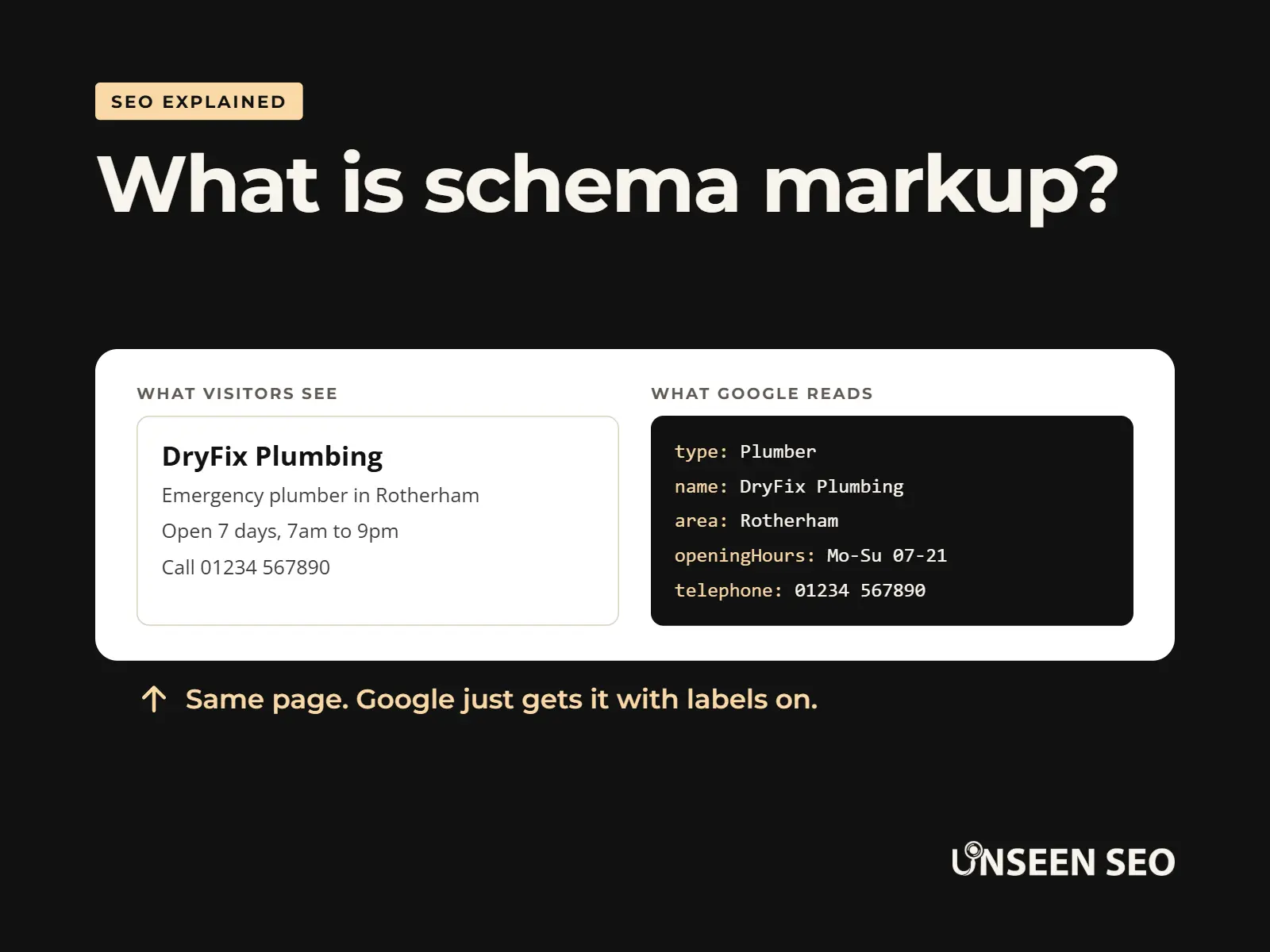
Same page, two different readers
What your visitors see
DryFix Plumbing
Emergency plumber in Rotherham
Open 7 days, 7am to 9pm
Call 01234 567890
What Google reads
type: Plumber
name: DryFix Plumbing
area: Rotherham
openingHours: Mo-Su 07:00-21:00
telephone: 01234 567890
A made-up business, simplified to show the idea.
What is Schema.org?
The labels come from a shared dictionary called Schema.org, which Google, Bing and Yahoo set up together in 2011 so they’d all understand the same labels. It covers hundreds of things, from local businesses and products to recipes, events and job adverts. That’s where the name “schema” comes from.
Is schema markup the same as structured data?
Near enough. Structured data is the general idea of organising information so computers can read it. Schema markup is the most common way of doing it on websites. Most people (Google included) use the two terms interchangeably, so you don’t need to worry about the difference.
How schema markup works
Schema sits in your page’s code, out of sight. Visitors never see it, but search engines read it when they visit (or “crawl”) your page.
There are three ways to write it: JSON-LD, Microdata and RDFa. Google says all three work, but it recommends JSON-LD because it’s the easiest to add and keep tidy. It’s a self-contained block of code, so it doesn’t get tangled up with the rest of your page. Here’s a simplified example for a made-up plumber:
<script type="application/ld+json">
{
  "@context": "https://schema.org",
  "@type": "Plumber",
  "name": "DryFix Plumbing",
  "telephone": "01234 567890",
  "url": "https://www.dryfixplumbing.co.uk",
  "address": {
    "@type": "PostalAddress",
    "streetAddress": "12 High Street",
    "addressLocality": "Rotherham",
    "postalCode": "S60 1XX",
    "addressCountry": "GB"
  },
  "openingHours": "Mo-Su 07:00-21:00"
}
</script>
Don’t panic if that looks like gibberish. You’ll almost never need to write it by hand, and you can see it’s really just a list of labels and values. “@type” says what kind of thing this is, and everything else fills in the details.
What schema can do: rich results
The most visible benefit of schema is rich results. These are Google results with extra bits added, like a price, a star rating or an event date, which make them stand out from the plain blue links around them.
bamforthsbakery.co.uk › shop › sourdough
Seeded Sourdough Loaf | Bamforth’s Bakery, Sheffield
£4.50 · In stock · Free local delivery
Baked fresh every morning with a crackly crust and a soft, seedy middle. Order by 2pm for next-day delivery across Sheffield.
That price and “In stock” line comes from Product schema. (Made-up bakery, sadly. We checked.)
Common rich results Google still shows include:
- Products: price, stock and delivery details
- Reviews: star ratings, for things like products, recipes and books
- Events: dates, times and venues
- Recipes: cooking times, ratings and photos
- Breadcrumbs: a tidy trail showing where the page sits on your website, instead of a long web address
- Business details: your logo, contact details and opening hours, which can feed into the information panel Google shows about a business
Schema doesn’t guarantee rich results
Here’s the small print. Adding schema makes a page eligible for rich results, but Google decides whether to show them. Its own documentation says there’s no guarantee, even if your schema is perfect.
Google also retires rich results from time to time. HowTo results went in 2023, and FAQ results stopped appearing for everyone in May 2026. That’s why anyone promising “schema will get you star ratings in Google” is overselling it.
Does schema markup help SEO?
Yes, but not in the way people often think. Schema isn’t a direct ranking factor. Google has said so, so adding it won’t move your page up the results by itself.
What it does do is help in three indirect ways:
- Google understands your pages better. Clear labels mean less guesswork about what your business is, where it is and what it offers
- Rich results can bring more clicks. A result with a price or a date stands out, which can raise your click-through rate (the share of people who see your result and click it). More clicks from the same position means more visitors
- Your business details stay consistent. Schema backs up the name, address and phone number on your website, which helps Google trust it’s all the same business
So it’s a helpful extra, not a magic button. A slow website with thin content won’t be rescued by schema. If you’re working through the bigger picture, our guide to technical SEO shows where schema fits among everything else.
Does AI use schema markup?
This is the question everyone’s asking now that Google’s AI Overviews and tools like ChatGPT answer questions directly.
The honest answer: nobody outside those companies knows for sure, and the evidence so far is mixed. Google still reads schema to understand pages, and its AI answers draw on its search results, so schema can help indirectly. But tests by SEO tool companies suggest many AI chatbots just read schema as ordinary text, the same as the rest of your page.
Our take: add schema because it accurately describes your business and helps search engines. Treat any AI benefit as a bonus, and be wary of anyone selling schema as a guaranteed way into AI answers.
Types of schema markup worth knowing
Schema.org lists hundreds of types. Most small businesses only need a handful:
| Schema type | What it describes | Who it’s for |
|---|---|---|
| LocalBusiness | Your business name, address, phone, opening hours and area. There are specific versions for plumbers, dentists, restaurants and lots more | Any business with customers in a local area |
| Organization | Your business name, logo, website and social profiles | Every business website, usually on the homepage |
| Product | Price, stock, delivery and reviews | Shops and anyone selling online |
| Article / BlogPosting | Headline, author and publish date | Blog posts and news articles |
| Event | Date, time, venue and tickets | Venues, classes, workshops |
| BreadcrumbList | Where a page sits within your website | Any website with more than a few levels of pages |
| Review | Ratings and reviews of something | Product and recipe pages (not reviews of your own business) |
| FAQPage | Questions and answers on a page | FAQ sections. No longer shows a rich result, but still helps describe the page |
For a typical local service business, LocalBusiness (or the specific version for your trade) and Organization do most of the heavy lifting. Add Product if you sell online, and Article if you write blog posts. (This post has Article schema, in case you were wondering. We’d be a bit embarrassed otherwise.)
Does your website need schema markup?
Short answer: it’s worth having, but it’s rarely the most urgent job on the list. Here’s a rough guide:
- Local service businesses (trades, salons, garages): add LocalBusiness schema with details that exactly match your Google Business Profile. Sort the Business Profile first, though. That matters far more for showing up locally
- Shops and online stores: Product schema is genuinely worth it, because prices and stock can show in Google. Most shop platforms add it automatically
- Restaurants and cafes: LocalBusiness (Restaurant or CafeOrCoffeeShop), plus opening hours and a link to your menu
- Anyone running events or classes: Event schema, so dates and times can appear in Google
- Blogs: Article schema, which most SEO plugins already add for you
Before you add anything, check what you’ve already got (see the next section). Lots of small business websites have some schema already, thanks to their website builder or SEO plugin, and nobody ever told them.
If your website isn’t showing up in Google at all, schema won’t fix that. Start with why your business isn’t showing up on Google instead.
How to check if your website has schema markup
This takes about two minutes, and it’s free:
- Google’s Rich Results Test. Search for “Rich Results Test”, paste in your web address and run it. It shows which rich results your page is eligible for and flags any errors
- Schema Markup Validator. Go to validator.schema.org and paste in your address. It lists every bit of schema on the page, not just the types Google uses for rich results
- Look at the code. Open your page, press Ctrl+U (Cmd+Option+U on a Mac), then search for application/ld+json. If it’s there, you’ve got JSON-LD schema
- Google Search Console. If you’ve set up Search Console, look for the reports for things like breadcrumbs, products or reviews. They list any pages with schema errors Google has spotted
- Check lots of pages at once. Crawlers like Screaming Frog (free for up to 500 pages) can pull out and check the schema on every page
If the tools find errors, don’t panic. Warnings are usually missing optional details. Errors are worth fixing, because broken schema can stop a page being eligible for rich results.
How to add schema markup to your website
You’ve got three options, from easiest to fiddliest.
1. Use your SEO plugin or website builder
This is the easiest route and covers most small businesses.
- WordPress: SEO plugins like Yoast, Rank Math and All in One SEO add basic schema (your organisation, articles, breadcrumbs) automatically. Most also have settings where you fill in your business details
- Shopify: most themes add Product schema to product pages already
- Wix and Squarespace: both add some schema automatically, and Wix lets you add your own in a page’s SEO settings
2. Use a free schema generator
Need something your plugin doesn’t do, like LocalBusiness schema with your exact opening hours? Free generator tools let you fill in a form and copy out the finished JSON-LD code. Search for “schema markup generator” and you’ll find several. Paste the code into your page’s <head> section, or into a custom HTML block if your website builder allows it.
3. Write it by hand
If you’re comfortable with code, you can write JSON-LD yourself using the Schema.org documentation and Google’s own guides as a reference. It’s how we added the extra schema on this website. For most people, though, options one and two are plenty.
Whichever route you take, test it afterwards with the Rich Results Test or the Schema Markup Validator. It takes a minute and catches typos before Google does.
Schema markup mistakes to avoid
- Marking up things that aren’t on the page. Google’s rules say schema must describe what visitors can actually see. Hidden prices, opening hours or reviews break that rule
- Adding star ratings for your own business. Google doesn’t show review stars for reviews a business puts on its own website about itself. Collect your reviews on your Google Business Profile instead
- Inventing reviews or ratings. Never a good idea. Spammy schema can earn a manual action from Google, which removes your rich results
- Letting details go out of date. If your opening hours or phone number change, update your schema, website and Business Profile together. Keeping them all the same is called NAP consistency
- Doubling up. Two plugins both adding schema can create duplicate or conflicting information. Check what you’ve got before adding more
- Picking the wrong type. Use the most specific type that fits. A plumber is better labelled as Plumber than as a generic LocalBusiness
- Expecting miracles. Schema helps Google understand you. It doesn’t replace good content, a quick website or a well-kept Business Profile
Common questions about schema markup
Quick answers to the questions people ask Google most about schema markup.
Schema markup is a set of labels you add to your website’s code to tell search engines exactly what things are. Instead of Google guessing that 01234 567890 is a phone number, the label says so. Visitors never see it, but Google does.
A local plumber might add LocalBusiness schema that labels their business name, address, phone number and opening hours. A shop might add Product schema that labels a product’s price and whether it’s in stock. Most schema is written as a short block of code called JSON-LD.
In SEO, schema is code that helps search engines understand your pages. There are hundreds of types on Schema.org, but the ones most small businesses use are LocalBusiness, Organization, Product, Article, Event, BreadcrumbList and Review.
Indirectly, yes. Google has said schema isn’t a direct ranking factor, so adding it won’t push you up the results by itself. But it helps Google understand your pages and can make them eligible for eye-catching rich results, which can bring in more clicks.
It’s useful, but it’s not the first thing to fix. Good content, a working website and a Google Business Profile matter far more for most small businesses. Once those are sorted, basic schema is a quick, sensible extra.
Paste your web address into Google’s free Rich Results Test or the Schema Markup Validator at validator.schema.org. Both show any schema they find and flag any errors. You can also view your page’s code and search for application/ld+json.
Possibly, but the evidence is mixed. Search engines read schema to understand pages, and AI answers often draw on search results, so it can help indirectly. Tests suggest many AI tools just read the code as ordinary text, so don’t expect schema alone to get you mentioned.
Yes. Google has retired some rich results, including FAQ results in May 2026, but it still uses schema to understand pages and still shows rich results for things like products, events, recipes and reviews. Schema that accurately describes your page is still worth having.
Usually not. Most WordPress SEO plugins and website builders add basic schema for you, and free generator tools can write the code for anything extra. You only need a developer for unusual setups or a lot of custom schema.
The 30-second version
Schema markup is hidden code that labels the information on your pages, so Google knows exactly what’s what. It’s free, it doesn’t directly improve rankings, and it doesn’t guarantee rich results. But it helps Google understand your business and can make your listings stand out. Check what you’ve already got with Google’s Rich Results Test, add LocalBusiness or Product schema if it’s missing, and keep it matching what’s on the page.
Want a hand with it?
Not sure whether your website has schema, or whether it’s working? Our £150 No Nonsense Audit checks it along with everything else holding your website back, then tells you in plain English what to fix first. No retainer, no contract. Fancy some help setting it up? That’s £50 an hour. Or just drop us a message with your question.

Leave a Reply