
A meta title is the clickable headline for your page in Google’s search results. It’s free to change, takes about two minutes, and it’s one of the simplest SEO jobs you can do yourself.
This guide covers what a meta title is, how it’s different from the heading on your page, how long it should be, and how to write one that gets clicked. With real examples, and without a single mention of “synergy”.
Contents
- What is a meta title?
- Meta title vs H1: what’s the difference?
- Does a meta title matter for SEO?
- How long should a meta title be?
- How to write a good meta title
- Meta title examples
- How to add or change your meta title
- How to check your current meta title
- Why Google sometimes changes your title
- Common meta title mistakes
- Common questions
What is a meta title?
A meta title is the name you give a web page in its code. Google usually uses it as the blue, clickable headline in your search results, and your browser shows it on the tab at the top of the screen.
You’ll also hear it called a title tag, a page title or an SEO title. Same thing, different names. (SEO people love a synonym almost as much as they love an acronym.)
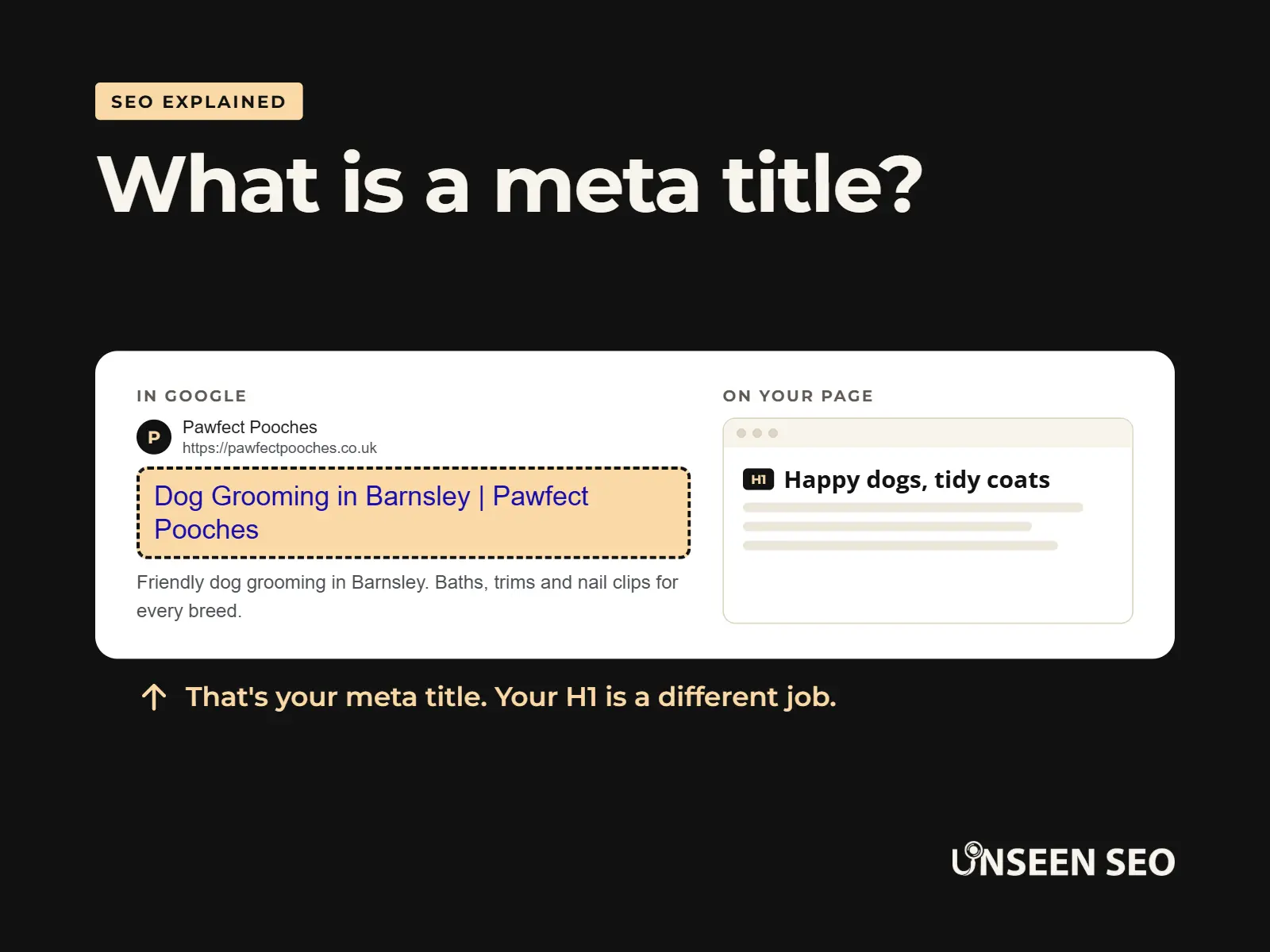
Here’s where it sits in a Google result:
pawfectpooches.co.uk
Dog Grooming in Barnsley | Pawfect Pooches
Friendly, fully insured dog grooming in Barnsley. Baths, trims and nail clips for every breed. Book online in a minute, or give us a ring.
That blue line is the meta title. The grey text under it is the meta description. (This is a made-up dog groomer, before anyone tries to book.)
In the page’s code, the meta title looks like this:
<head>
  <title>Dog Grooming in Barnsley | Pawfect Pooches</title>
</head>
Don’t worry if code isn’t your thing. Unless you built your website by hand, you’ll almost never need to touch it. There’s usually a simple box to fill in instead (more on that below).
Where else your meta title shows up
- Google and Bing results, as the clickable headline
- Browser tabs, so people can find your page among the 37 tabs they’ve got open
- Bookmarks, as the default name when someone saves your page
- Social media and messaging apps, sometimes, when someone shares your link and you haven’t set a separate social title
Meta title vs H1: what’s the difference?
This is the one that trips most people up. Your meta title and your page heading (the H1, short for “heading 1”) are two different things, even though they often say similar stuff.
The meta title is for search results. It’s what people see in Google before they’ve visited your website. The H1 is for the page itself. It’s the big headline people see once they’ve arrived.
| Meta title | H1 heading | |
|---|---|---|
| Where it appears | Google results, browser tabs, bookmarks | At the top of the page itself |
| Who sees it | People deciding whether to click | People already on your page |
| Where it lives | In the page’s code, inside the <head> | In the visible content of the page |
| Ideal length | Roughly 50 to 60 characters | No strict limit, just keep it clear |
| Job | Earn the click and tell Google what the page is about | Confirm they’re in the right place |
| How many per page | One | One |
Should my meta title and H1 be the same?
They can be, and that’s fine. But they don’t have to match word for word, and there’s often a good reason for them to be slightly different.
Your meta title has to work hard in a list of ten other results, so it often includes your location and business name. Your H1 doesn’t need to, because the visitor’s already found you. For example:
- Meta title: Sheffield Boiler Repairs, Same-Week Visits | Hotspot Heating
- H1: Boiler repairs, sorted this week
The important bit is that they’re about the same thing. If your meta title promises boiler repairs and the page heading says “Welcome to our blog”, Google gets confused, and so does everyone else. Google’s own guidance says the main heading should be clearly the most prominent title on the page, and it can use that heading when building your search result.
Does a meta title matter for SEO?
Yes, quite a lot, for two reasons.
It helps Google understand your page. Your meta title is one of the clearest clues you can give Google about what a page covers. If you want to be found for “boiler repairs Sheffield”, having those words in the title is a big hint. (Not a magic spell, though. The rest of the page still needs to back it up.)
It decides whether people click. Ranking gets you seen. Your title is what gets you chosen. The percentage of people who see your result and click on it is called your click-through rate, and a clear, relevant title can make a real difference to it. More clicks from the same position means more visitors, for free.
That’s why it’s one of the first things we look at in an SEO audit. Missing, duplicated or vague titles are some of the most common problems we find on small business websites, and some of the quickest to fix.
How long should a meta title be?
Aim for roughly 50 to 60 characters. That’s the short answer, and it’s a good rule of thumb.
The longer answer: Google doesn’t actually set a maximum length. It just cuts titles off when they’re too wide to fit the screen, and swaps the end for “…”. On a desktop, that usually happens at around 600 pixels wide, which works out at about 50 to 60 characters depending on the letters you use. (A title full of Ws takes up more room than one full of Is. Fonts are funny like that.)
A few practical tips:
- Put the important words first. If anything gets cut off, make sure it’s your business name, not what you actually do
- Don’t obsess over the exact count. A clear 64-character title beats a mangled 55-character one
- Don’t go too short either. “Plumber” is technically within the limit, but it’s not going to win anyone over
Not sure how yours measures up? Pop it into our free meta description checker. Despite the name, it checks titles too. It measures the width in pixels, the same way Google does, and shows you a preview on desktop and mobile.
How to write a good meta title
There’s a simple formula that works for most small business pages:
What you do + where you do it (or why pick you) | Your business name
So “Dog Grooming in Barnsley | Pawfect Pooches”, or “Sheffield Boiler Repairs, Same-Week Visits | Hotspot Heating”. Beyond that, here’s what makes a title work:
- Use the words your customers actually search for. “Dog grooming Barnsley”, not “canine aesthetic services”. Our guide to keyword research shows you how to find them for free
- Put your main keyword near the start. People scan results quickly, and it’s safer from being cut off
- Give every page its own title. If ten pages are all called “Hotspot Heating”, Google can’t tell them apart, and neither can your customers
- Make it match the page. The title is a promise. If the page doesn’t deliver on it, people bounce straight back to Google
- Match what the searcher wants. Someone searching “how to bleed a radiator” wants a guide, not a sales pitch. This is called search intent, and it should shape your title
- Add a reason to click if you’ve room. “Same-week visits”, “Open 7 days”, “Free quotes”. Only if it’s true, mind
- Use a separator for your brand. A vertical bar ( | ) or a dash between the main bit and your business name keeps things tidy
- Don’t stuff it with keywords. Repeating “plumber Rotherham” three times doesn’t help. It’s called keyword stuffing, and it’s one of the main reasons Google rewrites titles
Write it for a human first and Google second. Funnily enough, that’s usually what Google wants too.
Meta title examples
Here are some made-up local businesses to show the idea. Character counts are in brackets.
Good examples
- Homepage: Dog Grooming in Barnsley | Pawfect Pooches (42 characters)
- Service page: Sheffield Boiler Repairs, Same-Week Visits | Hotspot Heating (60 characters)
- Location page: Emergency Plumber in Rotherham | Open 7 Days | DryFix (53 characters)
- Blog post: How Often Should You Groom a Dog? A Simple Guide (48 characters)
Each one says what the page is about, puts the useful words first, and finishes with the business name. The blog post title skips the brand because it’s long enough already, and that’s fine.
Not-so-good examples
- Home (4 characters). Tells nobody anything. Google will probably rewrite it, and fair enough.
- Plumber Rotherham | Plumbers Rotherham | Cheap Plumber Rotherham | Rotherham Plumbing (85 characters). Keyword stuffing. Reads like a robot wrote it, and gets cut off halfway.
- Welcome to the Official Website of Hotspot Heating Ltd, Est. 1998 (65 characters). All about you, nothing about what you do or where. Nobody searches for “welcome”.
How to add or change your meta title
Good news: on most websites you don’t need to go anywhere near the code. Here’s where to look:
- WordPress: most sites use an SEO plugin such as Yoast, Rank Math or All in One SEO. Scroll down below your page content in the editor (or open the plugin’s panel) and look for a box called “SEO title”
- Wix: open the page’s settings and look for the SEO basics section, where you can edit the title tag
- Squarespace: open the page’s settings and go to the SEO tab, where you’ll find the SEO title
- Shopify: on the page or product, scroll to the search engine listing section at the bottom and click edit
- Hand-built website: edit the text inside the <title> tag in the page’s <head> section
If you don’t set a meta title, most website builders just use your page name instead. So “Services” or “Home” ends up being what people see in Google, which isn’t ideal.
Once you’ve made your changes, Google won’t see them straight away. It has to visit (or “crawl”) the page again first, which can take anything from a few days to a few weeks. If you’re impatient (who isn’t), you can ask Google to recrawl a page using Google Search Console.
How to check your current meta title
Not sure what your pages are called at the moment? Here are four quick ways to find out, all free:
- Hover over the tab. Open your page and hover your mouse over its browser tab. The full title pops up
- View the page’s code. Press Ctrl+U (or Cmd+Option+U on a Mac), then search for <title> with Ctrl+F
- Ask Google. Type site:yourwebsite.co.uk into Google to see the titles it shows for your pages. Spot lots of identical ones? That’s your first job
- Check lots of pages at once. A free crawler like Screaming Frog (free for up to 500 pages) lists every page’s title, length and any duplicates
Why Google sometimes changes your title
Here’s a slightly annoying truth: Google doesn’t always use the title you wrote. It builds the headline for each result automatically, and while it uses your meta title most of the time, it can pull text from other places instead, like your H1, other headings on the page, or the words other websites use when they link to you.
According to Google’s own help pages, it tends to swap your title out when:
- It’s missing or half-empty, like a title that’s just “Home” or your business name
- It’s out of date, like “Best Boilers 2023” in 2026
- It doesn’t match the page, so it would mislead people
- It’s the same on lots of pages, so it doesn’t describe any of them
- It’s stuffed with keywords or repeats itself
- The page has no clear main heading to back it up
You can’t force Google to use your title, and it doesn’t hand-edit individual results. But if you write a clear, accurate, unique title that matches your H1 and your content, it’ll use yours far more often.
Common meta title mistakes
- Leaving it as “Home”. The most common one we see. Your homepage title should say what you do and where
- Using the same title on every page. Google treats near-identical pages as a bit of a puzzle (see duplicate content), and customers can’t tell your pages apart in the results
- Putting the business name first on every page. Unless people already search for you by name, lead with what you do
- Writing an essay. Anything past 60-ish characters is likely to be cut off
- Promising things the page doesn’t deliver. Clickbait titles get clicks, then a swift exit
- Forgetting to update it. If you change what a page offers, change its title too. Same goes for dates
- Ignoring your blog posts. Every post needs a title that makes sense out of context, in a list of search results
Common questions about meta titles
Quick answers to the questions people ask Google most about meta titles.
A meta title is the title you give a web page in its code. Google usually shows it as the clickable blue headline in search results, and your browser shows it on the tab. It’s also called a title tag or SEO title.
They’re the two bits of text that make up your listing in Google. The meta title is the clickable headline, and the meta description is the short summary underneath it. The title helps Google understand your page and gets the click. The description just helps persuade people to click.
Aim for roughly 50 to 60 characters. Google doesn’t set a hard limit, but it cuts long titles off to fit the screen, which is usually around 600 pixels wide on a desktop. Put the most important words first so nothing important gets chopped.
No. The H1 is the main heading people see on the page itself. The meta title sits in the page’s code and shows up in Google and on the browser tab. They should be about the same topic, but they don’t have to be word for word the same.
An H1 is the main heading on a web page, the big headline at the top. Each page should have one, and it should tell visitors clearly what the page is about. Google can also use it when it builds the title for your search result.
For a dog groomer, a good homepage title would be “Dog Grooming in Barnsley | Pawfect Pooches”. It says what they do, where they do it and who they are, in 42 characters.
Hover over your page’s tab in your browser to see it, or press Ctrl+U (Cmd+Option+U on a Mac) to view the page’s code and search for <title>. You can also type site:yourwebsite.co.uk into Google to see the titles it shows for your pages.
Put it inside a <title> tag in the <head> section of your page, for example <title>Dog Grooming in Barnsley | Pawfect Pooches</title>. If you use WordPress, Wix, Squarespace or Shopify, you don’t need to touch any code. Just fill in the SEO title box in the page settings.
Yes. Google has ignored the meta keywords tag for well over a decade, so there’s no point filling it in. The meta title is a different thing entirely, and it still matters.
The 30-second version
A meta title is the clickable headline for your page in Google. It’s different from the H1 heading on the page itself, though the two should be about the same thing. Keep it to roughly 50 to 60 characters, put what you do and where at the front, finish with your business name, and give every page its own. It’s free, it takes two minutes, and it’s well worth doing.
Want a hand with it?
Got a website full of pages called “Home”? Our £150 No Nonsense Audit checks every page title (and plenty more besides), then tells you in plain English what to fix first. No retainer, no contract. Fancy an hour of help rewriting them together? That’s £50 an hour. Or just drop us a message with your question.

Leave a Reply