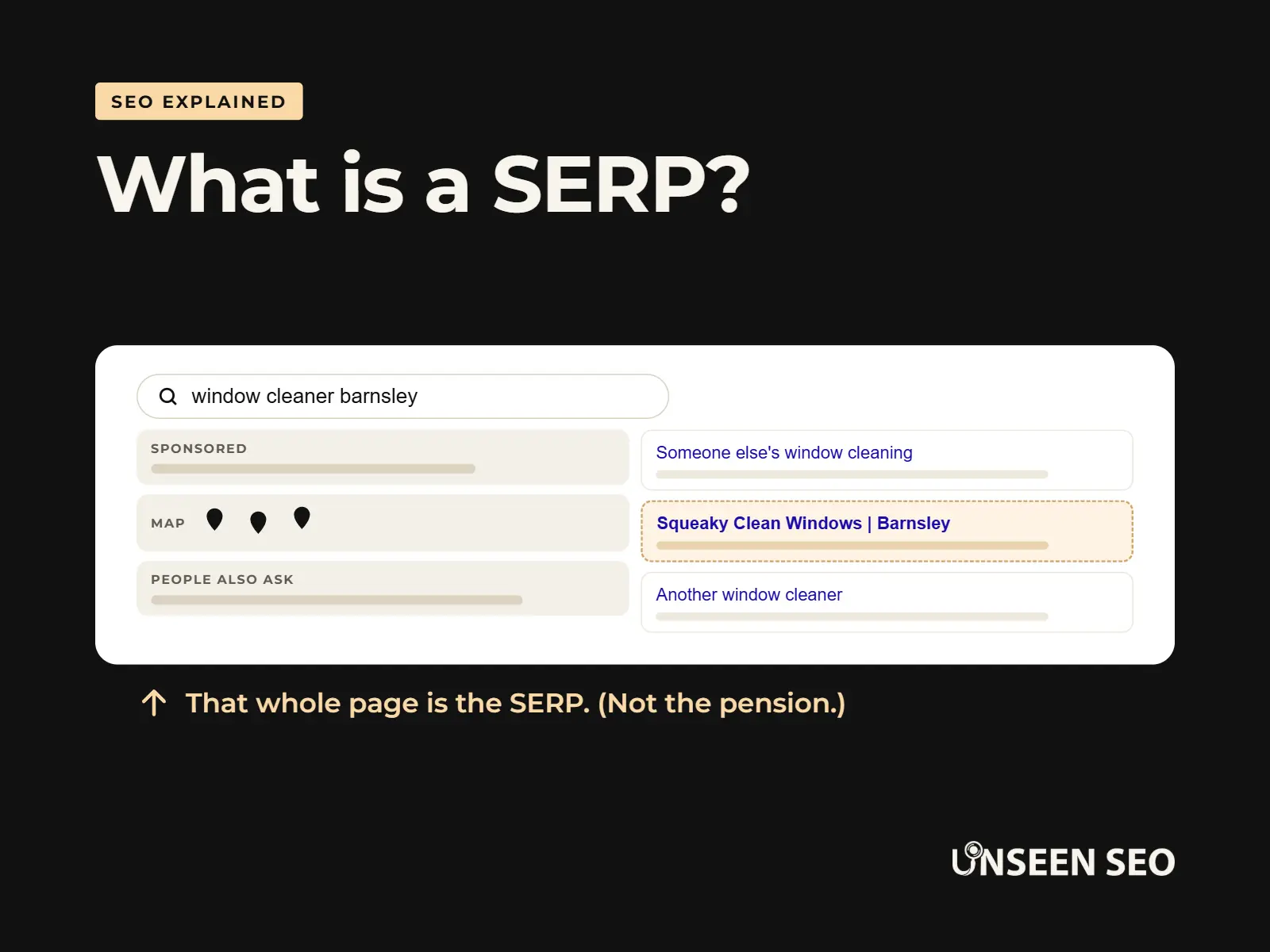
A SERP is simply the page of results you see after searching on Google. It stands for search engine results page, it costs nothing to show up on (outside the ads), and “ranking on the SERP” just means appearing on that page when people search for what you do.
This guide explains what a SERP is in SEO, what’s actually on one these days (it’s a lot more than ten blue links), why everyone sees something slightly different, and what it really means to “rank”. And no, it’s nothing to do with your pension. That’s SERPS, with an S, and a different article entirely.
Contents
- What is a SERP?
- What’s on a SERP?
- Organic vs paid results
- SERP features explained
- Why everyone sees different results
- What does “ranking on the SERP” actually mean?
- How to check where you rank
- How to show up on more of the SERP
- Common questions
What is a SERP?
SERP stands for search engine results page. Type “window cleaner Barnsley” into Google and press enter: the page that appears is the SERP. People say “SERPs” (plural) because every search creates its own.
In SEO, the SERP is the whole point. It’s the shop window where customers decide which business to click on. When an SEO person says “we want you higher on the SERPs”, they mean they want your website to show up nearer the top of that page, more often, for the right searches.
Is it the same on Bing?
Yes. Every search engine has its own results pages, so Bing, DuckDuckGo and the rest all have SERPs. In the UK, though, most people search on Google, so when people talk about SERPs they almost always mean Google’s.
What’s on a SERP?
A few years ago, a results page was mostly ten blue links. Now it’s more of a mixed bag. Google picks what to show based on what it thinks the person searching wants, so a search for a local service looks very different from a search for a recipe.
What a typical results page looks like
1. Sponsored
Ads. Businesses pay when someone clicks. Labelled “Sponsored”.
2. AI Overview
An AI-written summary, with links to the pages it used. Shows for some searches, not all.
3. Local pack
A map and three local businesses, pulled from Google Business Profiles.
4. Organic results
The ordinary blue links. Free, earned through SEO. This is what “ranking” usually means.
5. People also ask
Related questions that expand to show an answer from a web page.
Simplified. The exact mix and order changes from search to search.
For a typical local search, you might see some or all of these, roughly in this order:
- Sponsored results at the top (and sometimes the bottom). These are ads
- An AI Overview: an AI-written summary with links to the pages it drew on
- The local pack: a map with three businesses underneath, from their Google Business Profiles
- Organic results: the standard listings, each with a title, web address and short description
- People also ask: a box of related questions that open up to show an answer
- Images, videos or news, when Google thinks they’d help
- Related searches at the bottom, and links to page 2 and beyond
Organic vs paid results
This is the most important split on any results page.
| Organic results | Paid results (ads) | |
|---|---|---|
| Cost | Free to appear. You pay nothing per click | You pay each time someone clicks |
| How you get there | By having a useful, well-built website (that’s SEO) | By bidding in Google Ads |
| Label | None | Marked “Sponsored” |
| When you stop | Rankings usually stick around for a while | Ads disappear the moment you stop paying |
| Trust | Many people skip ads and go straight to these | Useful for quick results, but some people scroll past |
Google is clear that it doesn’t accept payment to rank a page higher in the organic results. So when someone promises “guaranteed first place on Google”, they’re either talking about ads or telling porkies.
SERP features explained
Anything on the results page that isn’t a plain blue link is called a SERP feature. Here are the ones small businesses are most likely to come across:
| Feature | What it is | Can you get in it? |
|---|---|---|
| Local pack | A map and three nearby businesses | Yes, with a complete Business Profile and genuine reviews |
| AI Overview | An AI-written summary at the top, with source links | Possibly, by having clear, helpful pages Google trusts. There’s no special trick |
| Featured snippet | A short answer from one web page, shown above the normal results | Sometimes, by answering a question clearly near the top of a page |
| People also ask | Related questions with short answers from web pages | Sometimes, by answering common questions in plain English |
| Rich results | Results with extras like star ratings, prices or event dates | Sometimes, with schema markup, though Google decides |
| Knowledge panel | A box of facts about a business, person or thing | For businesses, this usually comes from your Business Profile |
| Image and video results | Rows of pictures or videos | Yes, with good images (and alt text) or videos |
Which features appear depends entirely on the search. That’s why it pays to actually look at the results page for the searches you care about, rather than assuming.
Why everyone sees different results
Two people searching the same thing can see different results pages. Google tailors them using things like:
- Location. The big one for local businesses. “Plumber near me” in Barnsley and in Sheffield brings up completely different businesses
- Device. Phones and computers can show slightly different layouts
- Language and country settings
- Your past activity, if you’re signed in, can nudge things a little
This is why searching for your own business on your own phone isn’t a reliable way to check how you’re doing. Google might show you your website because it knows you visit it 30 times a day. Your customers aren’t getting the same special treatment.
What does “ranking on the SERP” actually mean?
When people talk about “ranking”, they usually mean your position in the organic results for a particular search. “We rank third for window cleaner Barnsley” means you’re the third organic result when someone searches that.
A few things worth knowing:
- You rank for searches, not overall. You might be first for one search and nowhere for another. That’s why keyword research matters: it tells you which searches are worth aiming for
- Page one is where the clicks are. Most people don’t go past the first page of results, so getting there for the right searches makes a real difference
- Top of the page isn’t always first place. Ads, a map and an AI Overview can all sit above the first organic result, especially on a phone
- The listing itself matters. Your meta title and meta description are what people read on the results page, so they decide whether you get the click
How to check where you rank
The best free option is Google Search Console. Its Performance report shows the searches your website appears for, how many times you showed up (impressions), how many people clicked, and your average position for each.
A quick search of your own is still useful for seeing what the results page looks like. To get a fairer view, use a private or incognito window and remember results will still vary by location. Paid rank tracking tools exist too, but most small businesses can get by with Search Console for a long time.
How to show up on more of the SERP
Because results pages are now so varied, there’s more than one way onto them. For most local businesses, the biggest wins are:
- Get your Google Business Profile right. It’s what powers the map results, and it’s free
- Collect genuine reviews. They help you show up and stand out in the local pack
- Have a proper page for each main service. Written for what people actually search, and matching their search intent
- Answer common questions clearly. It’s how you get into People also ask boxes, featured snippets and AI Overviews
- Write a tempting title and description for each page, so people choose you once you’re there
- Make sure Google can find you at all. If you’re not showing up anywhere, start with why your business might not be showing up on Google
Common questions about SERPs
Quick answers to the questions people ask Google most about SERPs.
SERP stands for search engine results page: the page Google (or Bing) shows you after you search for something. In SEO, it’s the page you’re trying to appear on, ideally near the top, when people search for what you offer.
When you search, Google looks through its index of web pages and picks the ones it thinks best answer your search, then arranges them on a results page along with any ads, maps, videos or AI summaries it thinks will help. That page is the SERP. It’s built fresh for every search.
SEO (search engine optimisation) is the work you do to help your website show up on Google. The SERP is the results page where it shows up. SEO is the effort; the SERP is where you see the result of it.
To give the searcher the most useful answer as quickly as possible. That might be a list of websites, a map of nearby businesses, a video or a quick answer at the top. Google chooses the layout based on what it thinks the person searching wants.
Yes. Search results pages look different from a few years ago, with AI Overviews, maps and more, but they’re still how most people find businesses online. Showing up on them, in whichever form, is still the point of SEO.
SERP features are anything on a results page that isn’t a standard blue link: ads, AI Overviews, featured snippets, People also ask boxes, the local map pack, image and video results, and so on. Some can be earned with good SEO; ads are paid for.
Paid results are adverts, labelled “Sponsored”, where businesses pay each time someone clicks. Organic results are the free listings Google ranks on merit. Google doesn’t accept payment to rank a page higher in the organic results.
Google tailors results to things like your location, language and device, so someone in Barnsley and someone in Leeds can see different results for the same search. That’s normal, and it’s why checking your own ranking by searching yourself can be misleading.
The most reliable free way is Google Search Console. Its Performance report shows the searches your site appears for and your average position for each. Searching for yourself gives a rough idea, but your results are tailored to you, so they’re not the full picture.
The 30-second version
A SERP is the search engine results page: what Google shows you after you search. It’s made up of ads, maps, AI Overviews, People also ask boxes and the normal organic results, and it’s different for every search and every location. “Ranking” means where you appear on it for a particular search. Search Console is the free way to see where you stand, and a good Business Profile, real reviews and clear, useful pages are the way to show up more.
Want a hand with it?
Not sure where you show up, or why a competitor keeps appearing above you? Our £150 No Nonsense Audit looks at the searches that matter to your business, where you appear on the results page and what’s holding you back, then tells you in plain English what to fix first. No retainer, no contract. If you’d rather talk it through, that’s £50 an hour. Or just drop us a message.

Leave a Reply