
If your website isn’t showing up on Google, it’s rarely as serious as it feels. Most of the time it’s something simple and free to fix, and you can work out which one in about five minutes.
Typing your own business name into Google and getting nothing back (or getting buried under three other businesses with a similar name) is enough to make anyone panic. This guide walks you through the quick checks, the 12 most common reasons, and exactly how to fix each one. Kettle on, let’s find it.
Contents
- First, check: is your website really missing?
- 12 reasons your website isn’t showing up on Google
- Find your reason in 30 seconds
- How to get your website to show up on Google
- How long does a new website take to show up?
- Why isn’t my business showing up on Google Maps?
- WordPress, Wix, Squarespace and Shopify: where to check
- Common questions
First, check: is your website really missing?
Before you fix anything, find out what’s actually going on. These three checks take two minutes:
- Search
site:yourwebsite.co.uk(with your own web address, no spaces). This shows the pages Google has in its index. No results at all? Google hasn’t added your website yet. Some results? Your website is there, it’s just not showing for the searches you tried. - Search in a private or incognito window. Google personalises results, so what you see isn’t always what a customer sees.
- Search your exact business name in quotation marks, like “Unseen SEO”, to see if it turns up anywhere at all.
Result A
Your search did not match any documents.
Google hasn’t indexed your website. Start with reasons 1 to 6.
Result B
Your Business Name | Home
Services | Your Business Name
You’re indexed, just not ranking. Jump to reasons 7 to 12.
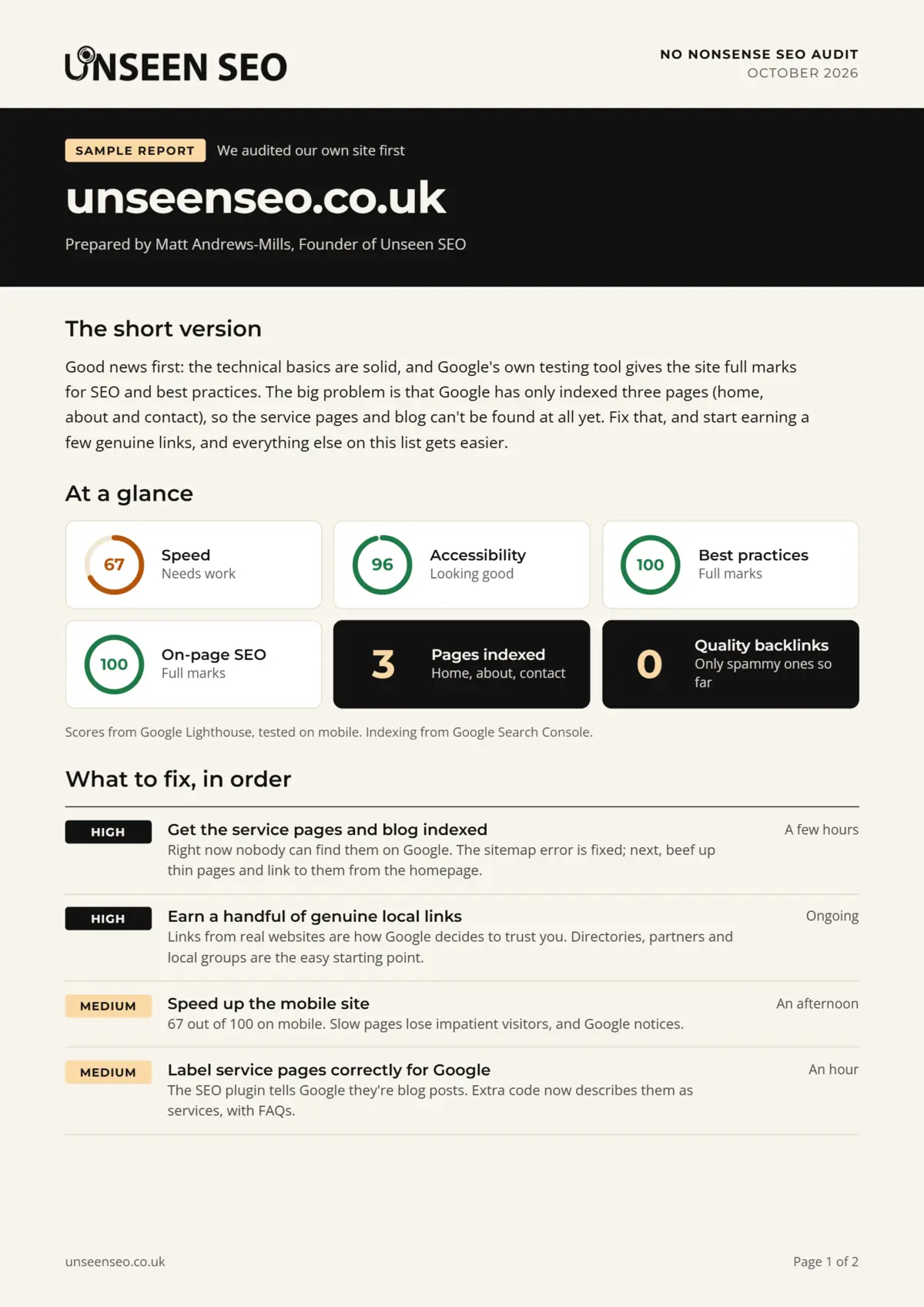
This catches out more businesses than you’d think, us included. When we audited our own website, only three of our pages were in Google’s index: the homepage, About and Contact.
12 reasons your website isn’t showing up on Google
Here are the usual suspects, roughly in the order worth checking. The first six stop Google adding your website at all. The last six are about why it’s there but hard to find.
1. Your website is brand new
Google doesn’t know your website exists the second you publish it. A search engine crawler (think of it as a very thorough, very slow postman) has to find it and read it first. For a brand new website, that can take anywhere from a few days to a few weeks.
If you launched recently, this is honestly the most likely reason, and there’s nothing wrong with your website at all. You can speed things up by telling Google about it (see how to fix it below).
2. Google hasn’t found it yet
Google mostly finds new websites by following links from other websites. If nothing links to you yet, and you haven’t told Google you exist, it may simply not have stumbled across you. Submitting a sitemap (a list of your pages) in Google Search Console fixes this.
3. A setting is telling Google to stay away
Website builders have a setting that hides your website from search engines while it’s being built. It adds a noindex tag, a tiny instruction telling Google not to list a page. It’s meant to be switched off when you launch, but it often isn’t. We show you where to check on each platform below.
4. Your robots.txt file is blocking Google
A robots.txt file tells search engines which parts of your website they can visit. A single wrong line can block Google from the whole thing. You can view yours by adding /robots.txt to the end of your web address. If you see Disallow: / under User-agent: *, that’s blocking everything.
5. Your website is password protected or still “coming soon”
If visitors need a password, or your website is still showing a coming soon or maintenance page, Google can’t see the real thing either. Easy to forget once you’re logged in and seeing it fine yourself.
6. Technical errors are getting in the way
Pages that show errors, take forever to load or redirect in circles can stop Google indexing them. Search Console’s Pages report lists these, with the reason for each. If it’s full of terms you don’t recognise, our plain English guide to technical SEO explains them.
7. You’re there, just not for the words you’re searching
If the site: search shows your pages, Google has you. It’s just ranking other pages above you. Customers rarely search your business name. They search what you do, like “plumber rotherham”. If those words aren’t clearly on your website, Google has little reason to show you. Keyword research helps you find the words people actually use.
8. Your website doesn’t say enough yet
If your homepage is mostly a logo and a phone number, Google doesn’t have much to go on. A page or two of plain, honest information about what you do and where you do it gives Google far more to work with. Pages with very little on them are often called thin content, and Google may not bother showing them.
9. Google is showing you something different
Here’s a plot twist. Google personalises results based on your location and what you’ve searched before, so what you see isn’t necessarily what a customer down the road sees. Try a private window, or ask a friend who’s never visited your website to search for you. You might have been panicking over nothing.
10. Your Google Business Profile isn’t set up or verified
Your website and your Google Business Profile are two different things. The profile is the free listing with your map pin, opening hours and reviews. Without a verified one, you’re unlikely to show on Google Maps, and Google has less to go on when connecting your name to your business. Our step by step Google Business Profile guide walks you through it.
11. Your business details don’t match everywhere
If your name, address or phone number is written differently on your website, Google Business Profile, Facebook and directories (say, “Unseen SEO” in one place and “Unseen SEO Ltd” in another), Google can struggle to work out they’re all the same business. Keeping them identical everywhere is called NAP consistency.
12. A Google penalty (rare, but possible)
If your website broke Google’s spam rules, for example by buying links or copying content, Google can take manual action and remove it. This is rare for small businesses. If it’s happened, Search Console’s Manual actions report will say so, and tell you why.
Find your reason in 30 seconds
Not sure which one’s yours? Tap the description that fits best.
“The site: search shows nothing at all”
Reasons 1 to 5Google hasn’t indexed your website. If it’s new, give it time and submit a sitemap. If not, check your search engine visibility setting, robots.txt and any password protection.
“It used to show up, then it disappeared”
Reasons 3, 6 or 12Something changed. A website update can switch the hide from search engines setting back on, or break pages. Check Search Console’s Pages and Manual actions reports.
“My pages show in the site: search, but not when I search my services”
Reasons 7 and 8You’re indexed but not ranking. Make sure each service has its own clear page, in the words your customers use.
“My website shows up, but my business isn’t on Google Maps”
Reasons 10 and 11Your Google Business Profile needs setting up, verifying or tidying. Check your details match your website exactly.
“I can find it, but my customers say they can’t”
Reason 9Probably personalisation. Search in a private window, or ask someone else to search for you.
How to get your website to show up on Google
Getting your website onto Google is free. Here’s the order we’d do it in:
- Set up Google Search Console. It’s free, it comes from Google, and it shows exactly what Google sees. Our Search Console guide takes about ten minutes.
- Submit your sitemap. Most website builders create one for you, usually at yourwebsite.co.uk/sitemap.xml. Add it in Search Console’s Sitemaps section.
- Request indexing for your key pages. Paste a page’s address into the URL inspection tool at the top of Search Console and click Request indexing.
- Check your settings. Make sure nothing is hiding your website from search engines (see where to check).
- Give each service its own page, written in your customers’ words, with your town or area on it.
- Set up your Google Business Profile if you serve local customers, and ask happy customers for reviews.
- Get a few links. Local directories, suppliers, your trade association or a local news story all help Google find and trust you.
- Be patient. Then check Search Console again in a week or two.
Want the bigger picture? Our free SEO for beginners guide covers all of this and more, in fifteen short chapters.
How long does a new website take to show up?
Usually somewhere between a few days and a few weeks, though there’s no fixed timetable. Google’s own advice is to allow at least a week after submitting a sitemap or requesting indexing before assuming there’s a problem.
Showing up and ranking well are different things, though. Your website might appear for its own name within days, but showing up for competitive searches like “electrician sheffield” usually takes months of steady work. Anyone promising page one by a certain date is guessing.
Why isn’t my business showing up on Google Maps?
Google Maps runs on your Google Business Profile, not your website. If your business isn’t on Maps, or never appears in the local pack (the map with three businesses at the top of local searches), check these:
- Is your profile verified? Unverified profiles often don’t show at all.
- Is your main category right? “Plumber” beats “Home services” for someone searching for a plumber.
- Are your details complete and consistent? Same name, address and phone number as your website.
- Do you have reviews? Recent, genuine reviews make a real difference. Here’s how to get your first Google reviews.
- How far away is the searcher? Distance matters. You’re unlikely to appear for searches on the other side of the county, however good your profile is.
Our Google Business Profile guide covers each of these step by step.
WordPress, Wix, Squarespace and Shopify: where to check
If your website is hidden from Google by a setting, here’s where it usually lives:
| Platform | Where to look | What it should say |
|---|---|---|
| WordPress | Settings › Reading › Search engine visibility | “Discourage search engines from indexing this site” should be unticked |
| Wix | Your dashboard’s SEO settings | “Let search engines index your site” should be switched on |
| Squarespace | Site availability settings, and each page’s SEO settings | Site not private or password protected, and “Hide page from search results” switched off |
| Shopify | Online Store › Preferences | Password protection switched off once your shop is live |
Menus move around from time to time, so if you can’t find the setting, search your platform’s help pages for “hide from search engines”.
Common questions about showing up on Google
Quick answers to the questions people ask most when their website goes missing.
Set up Google Search Console, submit your sitemap and request indexing for your main pages. Check nothing is hiding your website from search engines, give each service its own clear page, and set up a Google Business Profile if you have local customers.
Usually because Google hasn’t found it yet (nothing links to it and no sitemap has been submitted), or because something is blocking it, like a robots.txt rule, a hide from search engines setting or password protection.
If you can’t see any websites at all, it’s likely your internet connection or browser, not Google. If it’s just your own website you can’t see, try a private window and a site: search to check whether Google has indexed it.
Make sure Google can index your website, write clear pages about what you do and where, and set up a verified Google Business Profile. Reviews and links from local websites help too. It’s free, but it takes a little time.
Usually a few days to a few weeks. Google suggests allowing at least a week after submitting a sitemap or requesting indexing before assuming something is wrong.
Google has indexed your website, but it isn’t ranking for the services you offer yet. Give each service its own page in your customers’ words, and build up reviews and local links.
You can pay for Google Ads, which appear marked as Sponsored. You can’t pay Google to appear in the normal results underneath. Those are free, and earned through SEO.
The 30-second version
Search site:yourwebsite.co.uk. Nothing there? Your website is new, undiscovered or blocked, so set up Search Console, submit a sitemap and check your settings. Pages there but hard to find? Write clear pages about what you do, sort your Google Business Profile and give it time. Almost every case is fixable, and most fixes are free.
Still stumped?
If you’ve been through all of this and still can’t work it out, that’s the point to get someone to look under the bonnet. Our £150 No Nonsense Audit goes through your whole website and tells you exactly what’s going on and what to fix first, in plain English. Or drop us a message and ask. Asking costs nothing.

Leave a Reply