
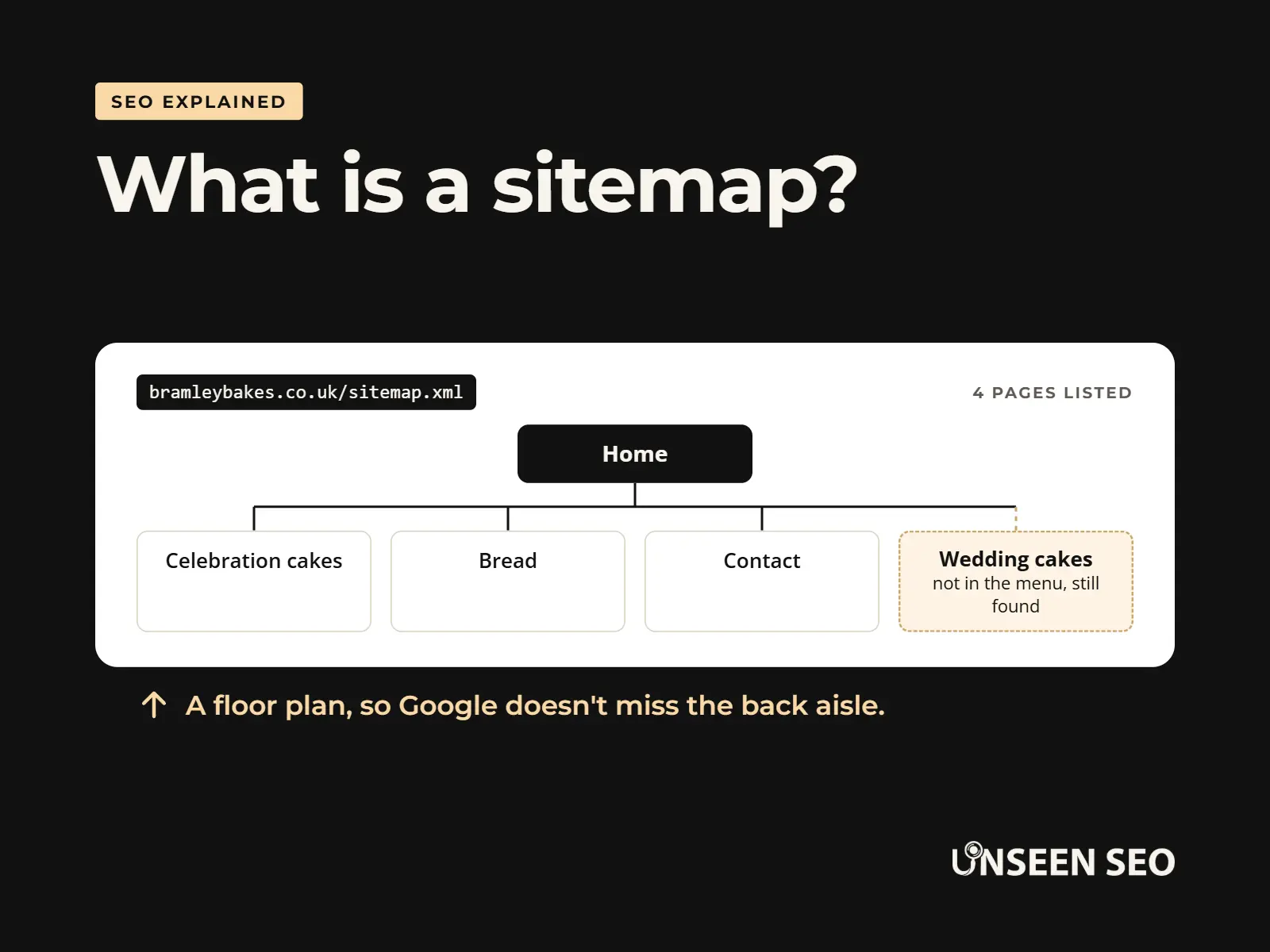
A sitemap is a simple list of the pages on your website that helps Google find them. It’s free, and if your site runs on WordPress, Wix, Squarespace or Shopify, you’ve almost certainly already got one without lifting a finger.
This guide covers what a sitemap actually is, whether a small business website needs one, how to find yours in about ten seconds, and how to hand it to Google so it’s doing its job. No tools to buy, and no code to write.
Contents
- What is a sitemap?
- What does a sitemap look like?
- Why sitemaps matter for SEO
- Do you need a sitemap?
- Does your website already have one?
- How to find your sitemap
- How to create a sitemap
- How to submit your sitemap to Google
- How to check your sitemap is working
- Sitemap mistakes to avoid
- Common questions
What is a sitemap?
A sitemap is a file that lists the pages on your website you’d like search engines to know about. Google describes it as a file that tells it about the pages, images and videos on your site and how they relate to each other.
Google normally finds pages by following links, hopping from one page to the next a bit like someone wandering round a shop. A sitemap is the floor plan by the door. It doesn’t change what’s on the shelves, it just makes sure nobody misses the aisle at the back with all the good biscuits.
The word gets used for three different things, which is where a lot of the confusion comes from:
Three things people call a sitemap
XML sitemap
A file listing your pages, written for search engines.
Who reads it: Google, Bing
HTML sitemap
A normal page of links, a bit like a table of contents.
Who reads it: your visitors
Visual sitemap
A diagram of boxes and lines used to plan a new website.
Who reads it: web designers
When people talk about sitemaps and SEO, they almost always mean the first one.
XML sitemaps vs HTML sitemaps
An XML sitemap is written for search engines. It lives at an address like yoursite.co.uk/sitemap.xml, and visitors never normally see it. This is the one that matters for SEO, and it’s what the rest of this guide is about.
An HTML sitemap is a normal page on your website with links to all your other pages, sometimes linked from the footer. It can help visitors on bigger sites, but on a typical small business website with a tidy menu, nobody misses it if it isn’t there.
A visual sitemap is a planning diagram that web designers use before building a site. Useful for planning, but Google never sees it, so it has nothing to do with your rankings.
Are there other types?
Yes, though most small businesses can ignore them. There are image, video and news sitemaps for sites with lots of that kind of content, and sitemap index files, which are simply a list of other sitemaps. Plenty of WordPress SEO plugins use an index file, splitting your pages, posts and categories into separate sitemaps.
What does a sitemap look like?
Underneath, an XML sitemap is just a list of web addresses wrapped in a bit of code. Here’s a cut-down example for a made-up bakery:
<?xml version="1.0" encoding="UTF-8"?>
<urlset xmlns="http://www.sitemaps.org/schemas/sitemap/0.9">
  <url>
    <loc>https://www.bramleybakes.co.uk/</loc>
    <lastmod>2026-10-28</lastmod>
  </url>
  <url>
    <loc>https://www.bramleybakes.co.uk/celebration-cakes/</loc>
    <lastmod>2026-09-14</lastmod>
  </url>
  <url>
    <loc>https://www.bramleybakes.co.uk/contact/</loc>
    <lastmod>2026-06-02</lastmod>
  </url>
</urlset>
Each <url> entry has two parts worth knowing about:
- loc is the full web address of the page
- lastmod is the date the page last changed in a meaningful way. Google says it uses this date, but only if it’s consistently accurate
You might also spot priority and changefreq tags in some sitemaps. Google ignores both, so there’s no need to fiddle with them. Setting every page to top priority is the SEO equivalent of marking every email as urgent.
If you open your own sitemap in a browser, it’ll probably look much friendlier than this. Most platforms add some styling so it shows as a neat table of links and dates.
Why sitemaps matter for SEO
Before Google can show a page in search results, it has to find it (crawling) and then file it away (indexing). If a page never gets found, it never gets a chance to rank. A sitemap helps with that very first step.
It’s most useful for:
- New websites, which don’t have many links from other sites yet, so Google has fewer routes in
- Pages that aren’t well linked from the rest of your site, such as an old service page that’s dropped out of the menu (an orphaned page)
- Pages you’ve just changed, since an accurate lastmod date hints that it’s worth another look
- Bigger websites, where it’s harder to make sure every page is linked from somewhere
What a sitemap won’t do is just as important. It isn’t a ranking factor, so it won’t move you up the results on its own. And Google is clear that it doesn’t guarantee every page in it gets crawled or indexed. It’s a helpful hint, not an instruction. If pages are being ignored, the cause is usually something else, like thin content or a stray noindex tag (more on that in why your business might not be showing up on Google).
Do you need a sitemap?
Strictly speaking, not always. Google says you might not need one if your site is small (around 500 pages or fewer that you want in search), your pages are all linked together properly, and you don’t rely on lots of images, videos or news articles.
That describes most small business websites. So why bother? Because a sitemap costs nothing, usually takes no effort, and gives Google a backup route to every page. Google itself says most sites will benefit from having one. It’s a bit like a spare key: you hope you never need it, but you’re glad it’s there.
| Your situation | Do you need a sitemap? |
|---|---|
| Brand new website | Yes. It helps Google find your pages before many other sites link to you |
| Small, well-organised site (under about 500 pages) | Not essential, but worth having and submitting, since it’s free |
| Online shop or a site with hundreds of pages | Yes. It’s the easiest way to make sure nothing gets missed |
| Lots of photos or videos you want found in search | Yes, and it’s worth including images or video in it |
| Pages that change often (events, prices, blog posts) | Yes. Accurate lastmod dates help Google spot the changes |
Does your website already have one?
Probably. Most website platforms create and update a sitemap for you automatically, so a lot of business owners have had one for years without knowing. Here’s where it usually lives:
| Website platform | Sitemap created automatically? | Usual address |
|---|---|---|
| WordPress (no SEO plugin) | Yes, built in since 2020 | /wp-sitemap.xml |
| WordPress with Yoast SEO or Rank Math | Yes, replaces the built-in one | /sitemap_index.xml |
| Wix | Yes | /sitemap.xml |
| Squarespace | Yes | /sitemap.xml |
| Shopify | Yes | /sitemap.xml |
| Older or hand-built website | Often not | Check with whoever built it |
Other WordPress SEO plugins use their own addresses, so if neither of the WordPress ones above works, have a look in your plugin’s settings.
How to find your sitemap
This takes a few seconds. Work down the list until one works:
- Try the usual addresses. Type your web address followed by /sitemap.xml into your browser, then /sitemap_index.xml, then /wp-sitemap.xml. If you see a list of links (or a page of code), you’ve found it
- Check your robots.txt file. Go to yoursite.co.uk/robots.txt. Many sites include a line starting “Sitemap:” with the full address. (Not sure what robots.txt is? It’s a small file of instructions for search engines, explained in our glossary)
- Look in Google Search Console. If you’ve set it up, the Sitemaps report (under Indexing) shows any sitemap that’s been submitted
- Check your website settings. Your SEO plugin or website builder’s SEO settings usually show the sitemap address
One thing to watch for: if the address just shows your homepage, that’s not a sitemap, that’s your website politely redirecting you. It usually means there isn’t one at that address, or something’s misconfigured. It’s a surprisingly common problem, and worth flagging to whoever looks after your site.
How to create a sitemap
If your website doesn’t have one, there are three ways to get one, from easiest to most fiddly.
1. Let your website platform do it
On WordPress, the built-in sitemap is switched on by default. If you’d like more control (leaving out pages you don’t want in Google, for example), a free SEO plugin like Yoast SEO or Rank Math will create one and keep it updated. On Wix, Squarespace and Shopify it’s already done for you.
2. Use a sitemap generator
For websites that can’t make their own, a crawler or generator tool will visit your pages and produce the file for you. Screaming Frog SEO Spider, for example, is free for sites up to 500 pages and has a sitemap option built in. You’ll then need to upload the file to your website, usually to the main folder so it sits at yoursite.co.uk/sitemap.xml.
The catch is that a generated sitemap doesn’t update itself. Add a new page and you’ll need to make a new sitemap, so this is best for websites that rarely change.
3. Write it by hand
For a tiny website, you could copy the example above and fill in your own pages. It’s perfectly valid, but it’s easy to forget to update, so we’d only suggest it if nothing else is an option.
Whichever way you go, a few rules from Google are worth sticking to:
- Use full web addresses (https://www.yoursite.co.uk/page/), not shortened ones
- Only include pages you actually want to appear in Google
- List the main version of each page, not duplicates or ones that redirect elsewhere
- Keep each sitemap under 50,000 web addresses and 50MB (which won’t trouble most small businesses)
How to submit your sitemap to Google
Google may well find your sitemap on its own, but submitting it takes two minutes and means you can see how Google’s getting on with it.
- Open Google Search Console (if you haven’t set it up yet, our guide walks you through it)
- Choose Sitemaps from the menu, under Indexing
- Type the end of your sitemap address (for example, sitemap.xml or sitemap_index.xml) into the box
- Press Submit
There’s a step-by-step version with more detail in the sitemap section of our Search Console guide. If you use a sitemap index file, you only need to submit that one; Google will follow it to the others.
Two other ways to tell search engines about it:
- Add it to your robots.txt file with a line like
Sitemap: https://www.yoursite.co.uk/sitemap.xml. Many platforms do this for you - Submit it to Bing through Bing Webmaster Tools, which can import your sites straight from Search Console. Bing is smaller than Google, but it’s free traffic
Don’t expect instant results. Submitting a sitemap is a hint, not a request Google has to act on straight away, and it can take days or weeks for new pages to appear.
How to check your sitemap is working
A sitemap that’s broken is worse than useless, because you think it’s doing a job when it isn’t. Once it’s submitted, the Sitemaps report in Search Console shows a status next to it:
| Status | What it means | What to do |
|---|---|---|
| Success | Google read the sitemap without problems | Nothing. Have a cup of tea |
| Has errors | Google read it, but some of it didn’t make sense | Click into the report to see which errors, then fix them or ask your web person |
| Couldn’t fetch | Google couldn’t open the sitemap at all | Check the address works in your browser and isn’t blocked by robots.txt |
It’s also worth glancing at the number of discovered pages. If your website has 25 pages and the sitemap shows 3 (or 300), something’s off, and it’s worth a closer look.
A quick check every month or two is plenty. It’s also worth looking straight after any big change to your website, like a redesign, a new theme or swapping SEO plugins, since that’s when sitemaps most often go wrong.
Sitemap mistakes to avoid
- Including pages you’ve hidden from Google. If a page has a noindex tag, it shouldn’t be in your sitemap too. It’s mixed messages, like inviting someone round and then not answering the door
- Listing old or broken pages. Pages that redirect or show a 404 error waste Google’s time and make your sitemap look untrustworthy
- Running two sitemaps at once. Swapping SEO plugins can leave an old sitemap behind. Make sure Search Console points at the one that’s actually live
- Fake “last updated” dates. Updating lastmod on every page every day, when nothing’s changed, teaches Google to ignore the dates altogether
- Blocking it in robots.txt. If robots.txt tells Google to stay out of the folder your sitemap lives in, it can’t read it
- Submitting it and forgetting it. A sitemap can quietly break after a website update. A quick look in Search Console now and then catches it
- Expecting it to fix everything. A sitemap gets your pages noticed. Getting them ranked is down to good content and the rest of your technical SEO
Common questions about sitemaps
Quick answers to the questions people ask Google most about sitemaps.
It’s an XML sitemap: a file that lists the pages on your website you want search engines to find. It helps Google discover your pages and spot when they’ve changed. It doesn’t improve your rankings by itself, but it makes sure Google knows your pages exist.
An XML sitemap looks like a plain list of web addresses wrapped in code, usually with a date next to each one showing when the page last changed. Most website platforms add some styling so it shows as a tidy table in your browser. An HTML sitemap just looks like a page of links.
Type your web address followed by /sitemap.xml into your browser. If that doesn’t work, try /sitemap_index.xml or /wp-sitemap.xml. You can also look in your robots.txt file (yoursite.co.uk/robots.txt) for a line starting “Sitemap:”, or check the Sitemaps report in Google Search Console.
The same way as your own: try /sitemap.xml and /sitemap_index.xml on the end of the web address, then check the site’s robots.txt file for a “Sitemap:” line. If none of those work, the site may not have one, or it may be at an unusual address.
No, but most modern ones do without the owner realising. WordPress, Wix, Squarespace and Shopify all create one automatically. Older or hand-built websites are the ones most likely to be missing one.
Not strictly. Google says small websites (roughly 500 pages or fewer) that link their pages together well can usually be found without one. But a sitemap is free, usually automatic and does no harm, so it’s well worth having and submitting to Google.
Indirectly. A sitemap helps Google find and recrawl your pages, which is the first step to them appearing in search at all. It isn’t a ranking factor, and it doesn’t guarantee every page gets indexed. It just means none of your pages get missed for want of a map.
If your website platform or SEO plugin creates it, you don’t need to do anything: it updates itself whenever you add or change a page. If you made one by hand or with a generator, update it whenever you add, remove or rename pages.
No. A sitemap is a list of pages you’d like search engines to visit. A robots.txt file is a set of instructions about which parts of your site they shouldn’t crawl. They work together, and your robots.txt file can point to your sitemap.
The 30-second version
A sitemap is a list of your website’s pages that helps Google find them. If your site is on WordPress, Wix, Squarespace or Shopify, you’ve almost certainly already got one: try yoursite.co.uk/sitemap.xml or /sitemap_index.xml to check. Small sites don’t strictly need one, but it’s free, so submit it in Google Search Console, glance at the report now and then, and only include pages you actually want people to find.
Want a hand with it?
Not sure whether your sitemap is working, or why some of your pages aren’t showing up on Google? Our £150 No Nonsense Audit checks your sitemap along with everything else holding your website back, then tells you in plain English what to fix first. No retainer, no contract. Need help sorting it? That’s £50 an hour. Or just drop us a message with your question.

Leave a Reply